

A travel eSIM and VPN usually work together without special setup. Your eSIM supplies mobile data, while the VPN protects internet traffic. Therefore, eSIM VPN compatibility mainly depends on the local network, VPN protocol, and phone settings. Server location also matters more than the digital SIM itself.
However, problems can appear after landing or switching networks. Many travelers then search Does VPN Work with eSIM or report eSIM VPN not working. This guide explains every likely cause and practical fix. It also covers speed, device settings, restricted countries, and business use.
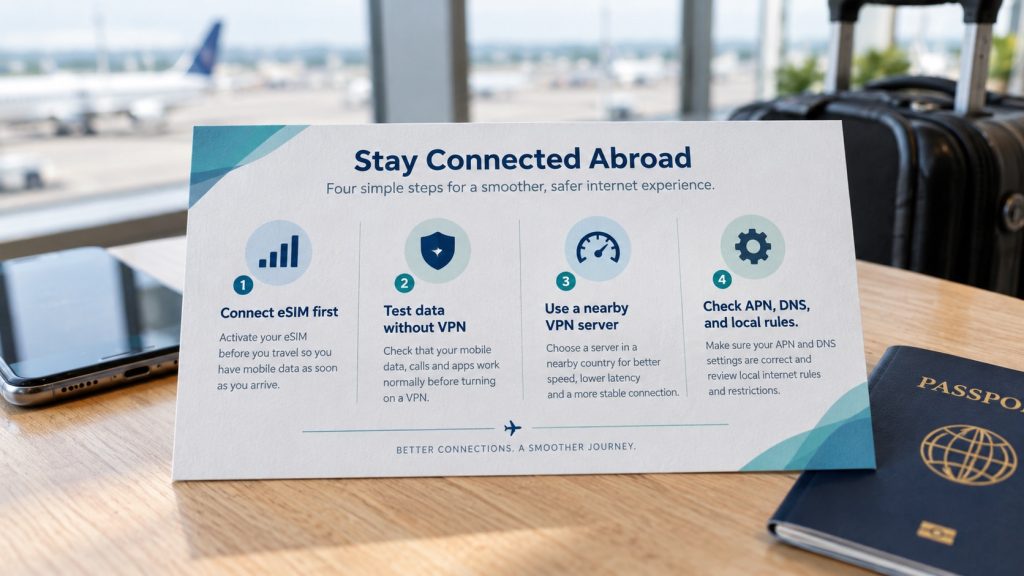
Yes, you can normally run a VPN with travel eSIM on iPhone or Android. First, activate mobile data and confirm normal browsing. Next, connect your VPN. If Travel eSIM VPN issues appear, test each service separately. Afterwards, change APN, DNS, VPN, or network settings only when necessary.
Situation | Best recommendation | Why it helps |
New eSIM | Test data before enabling VPN | Separates eSIM faults from VPN faults |
Slow browsing | Choose a nearby VPN server | Usually reduces latency |
No internet | Pause the kill switch temporarily | Reveals a failed VPN tunnel |
Corporate access | Ask IT for a mobile-friendly protocol | Some mobile networks restrict IPsec |
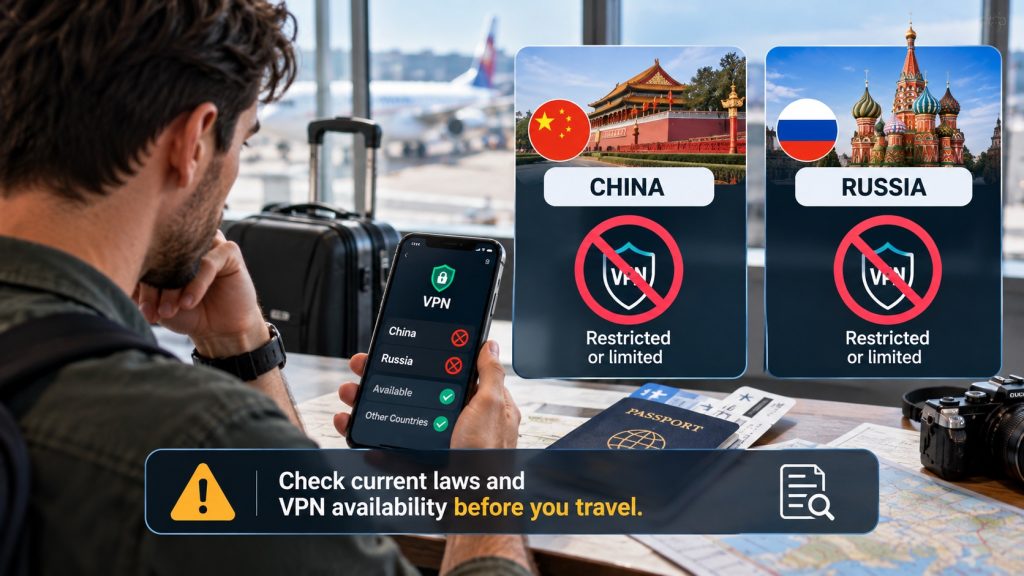
China or Russia | Check current laws before travel | VPN rules and availability can change |
An eSIM authenticates your phone on a mobile network and delivers data. Meanwhile, a VPN creates an encrypted tunnel over that connection. Consequently, changing from physical SIM to eSIM rarely changes VPN operation. This basic separation explains broad eSIM VPN compatibility across consumer devices.
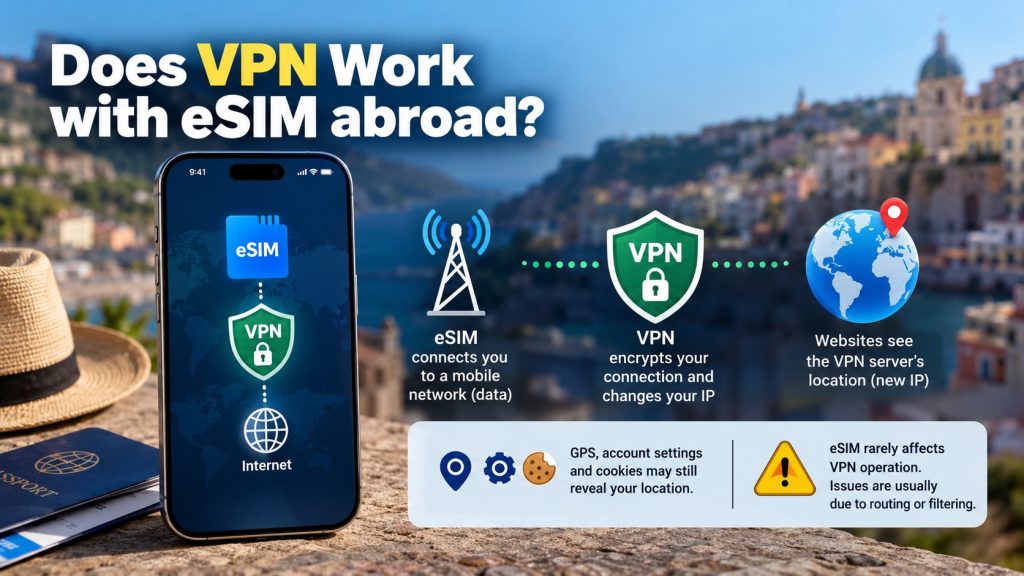
A VPN also replaces the public IP visible to websites with its server’s IP. However, GPS, account settings, and cookies may still reveal location. Therefore, VPN affecting eSIM connection reports often involve routing or filtering. They rarely indicate physical damage or a deleted profile.
Your traffic follows a simple path: phone, partner mobile network, eSIM provider routing, VPN server, then website. Each extra stage can add delay. Thus, eSIM internet speed with VPN depends on several factors. These include signal, congestion, routing distance, encryption, protocol, and server load.
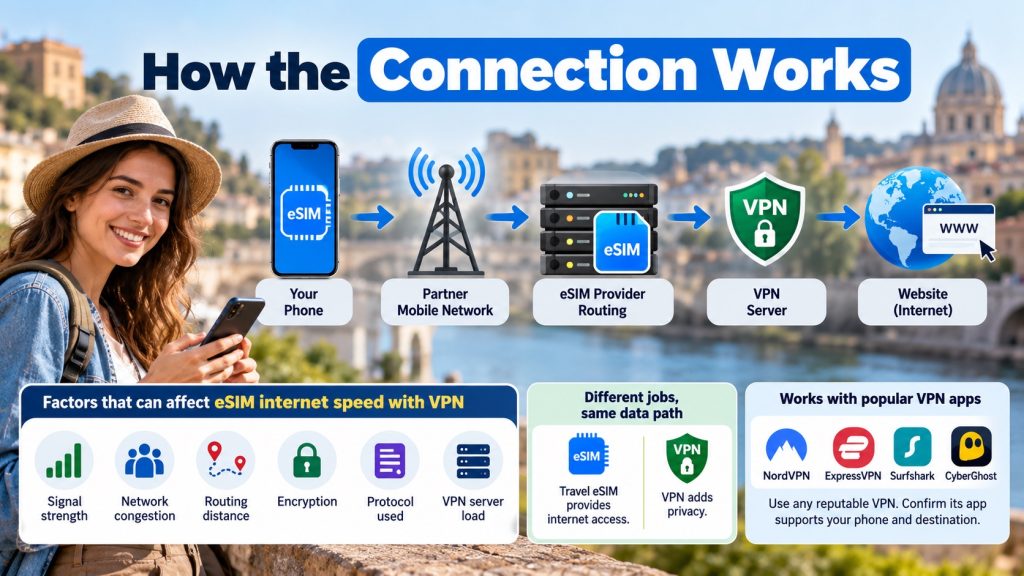
Although both services share the same data path, they perform different jobs. The travel eSIM provides internet access, while the VPN adds privacy. Accordingly, you may use NordVPN, ExpressVPN, or another reputable service. Confirm its app supports your phone and destination first.
A VPN may connect yet block browsing because DNS requests fail or the kill switch detects instability. Alternatively, the mobile network may restrict certain ports or protocols. Consequently, eSIM VPN not working can mean failed data, failed tunneling, blocked DNS, or one unreachable server.
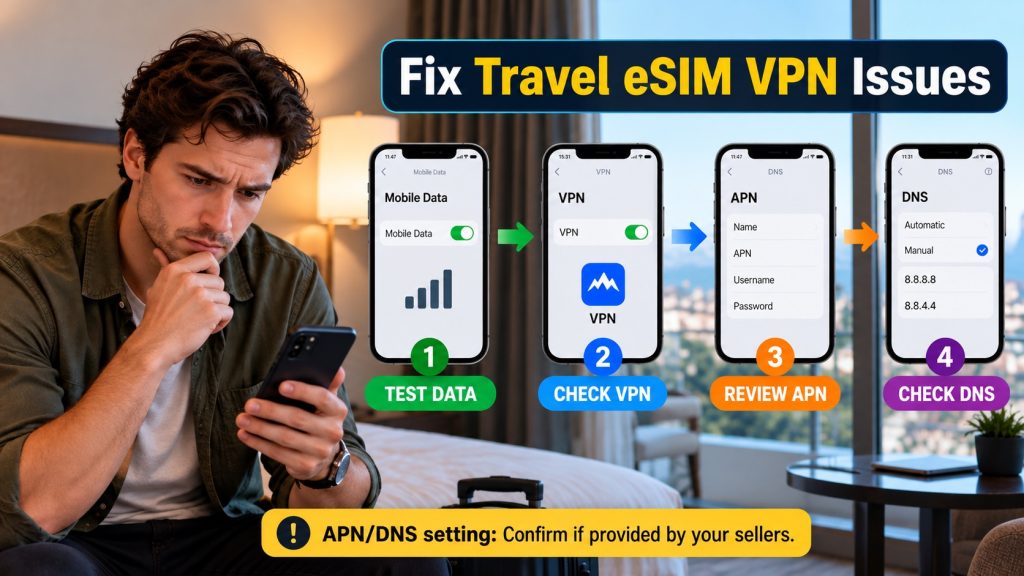
Other causes include an incorrect APN, disabled data roaming, weak coverage, battery restrictions, or competing VPN profiles. Moreover, hotel Wi-Fi switching can interrupt the tunnel. When users notice a VPN affecting eSIM connection, automatic switching deserves inspection. Aggressive security settings may also explain the failure.
First, disable the VPN and open two ordinary websites through mobile data. If both fail, fix the eSIM connection first. Check the selected data line, roaming requirement, plan balance, coverage, and APN. This order prevents unnecessary VPN changes and quickly identifies Travel eSIM VPN issues.
Next, reconnect the VPN using its automatic setting. Otherwise, select another nearby server and test again. Then switch between available protocols, such as WireGuard, Lightway, IKEv2, or OpenVPN. Providers commonly recommend changing servers and protocols when a VPN with travel eSIM disconnects.
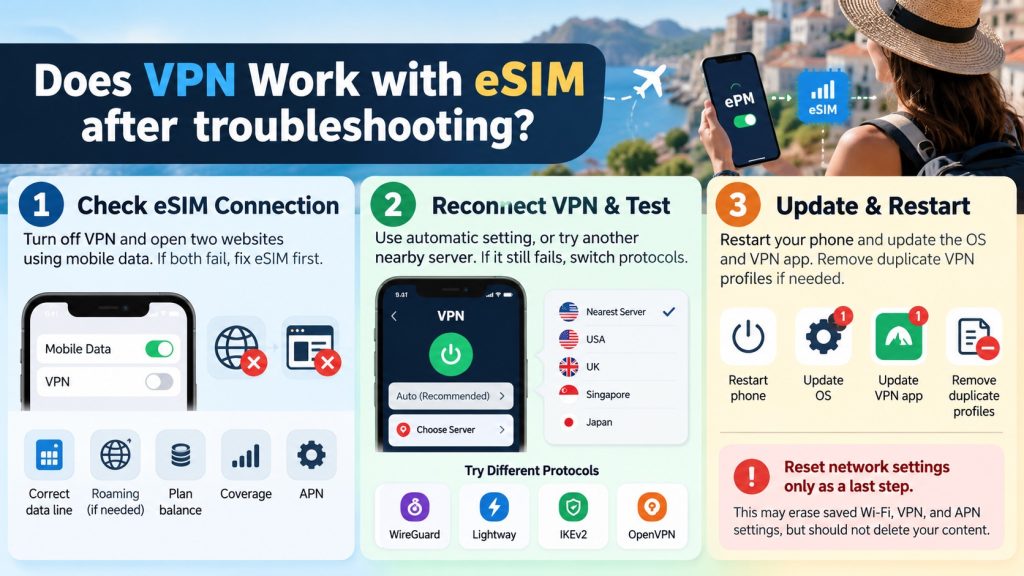
Finally, restart the phone and update both operating system and VPN app. Remove duplicate VPN profiles if necessary. However, reset network settings only as a later step. That reset may erase saved Wi-Fi, VPN, and APN settings, although it should not delete content.
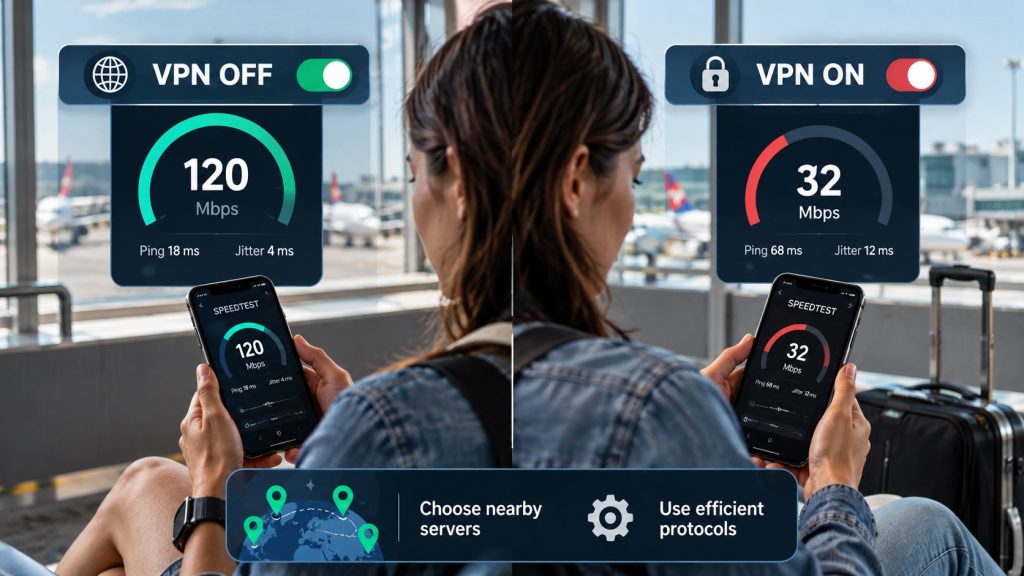
Encryption and longer routing can reduce eSIM internet speed with VPN, particularly through distant servers. Therefore, select the nearest suitable server and compare tests under similar signal conditions. Also, pause downloads, cloud backups, and video streams before measuring. Increased distance commonly raises latency.
A VPN also adds some data overhead because it wraps traffic inside encrypted packets. Consequently, it can consume slightly more plan data. Google confirms its VPN uses mobile data for encryption and network optimization. Therefore, monitor usage carefully when your travel plan has a small allowance.
Split tunneling can send selected apps outside the VPN, where available. Therefore, use it for trusted streaming or map apps when speed matters. However, keep banking, email, and work apps protected. Always follow employer rules before excluding corporate traffic from an approved tunnel.
Your phone model, work setup, and destination rules can affect VPN reliability. Therefore, check your cellular-data line, app permissions, and company requirements before departure. Also, research local VPN restrictions early, especially when visiting countries with controlled internet access or changing digital laws.
Does VPN Work with eSIM on iPhone and Android?
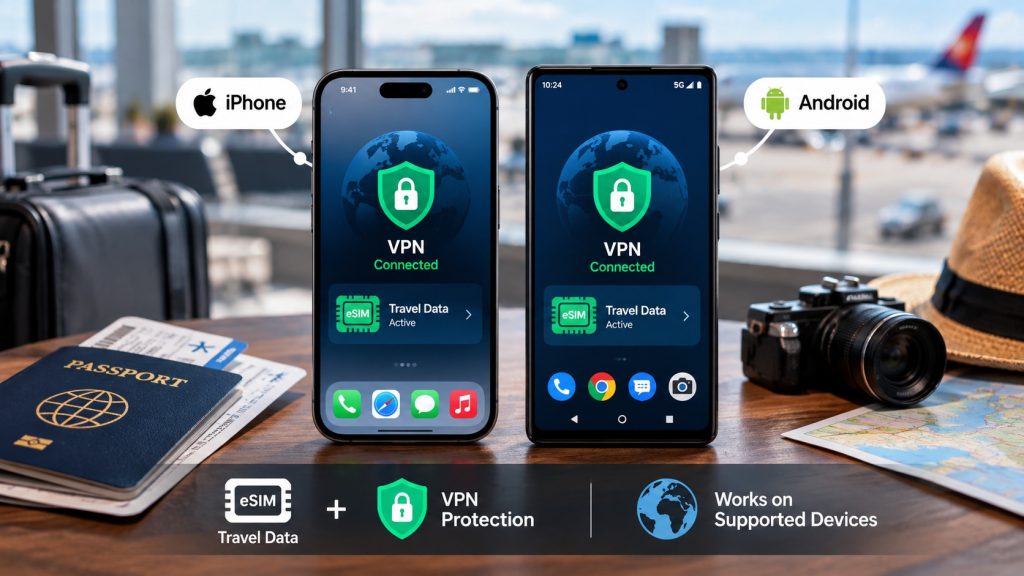
Yes, supported iPhones and Android phones can use VPN apps over cellular service. On iPhone, select the travel line for Cellular Data. On Android, allow the VPN app mobile-data and background access. These checks improve eSIM VPN compatibility during network changes.
Dual-SIM users should also confirm which line handles mobile data. Otherwise, the home SIM may roam unexpectedly while the travel plan sits idle. Therefore, disable cellular-data switching when strict control matters. Keep the home line active only when calls or verification messages remain necessary.
Corporate tunnels can face stricter problems. Some mobile networks restrict IPsec traffic, while carrier-grade NAT complicates certain connections. Therefore, ask IT about TCP 443, SSL, or alternative approved protocols. Never change corporate certificates, DNS, or security policies without authorization from your employer.
China and Russia restrict VPN access and online services. Moreover, rules can change quickly. Official travel guidance warns that most VPN use in China may be illegal. Australian guidance also notes broad VPN restrictions in Russia. Therefore, check official advice and company policy before departure.
Stay connected with Symbaa by Hubbing Ecom
Reliable data makes VPN troubleshooting much easier. Therefore, choose an affordable travel eSIM matching your destination, trip length, and expected usage. Hubbing Ecom offers travel eSIM plans and physical data cards. Customers can buy through its website or the Symbaa Application.
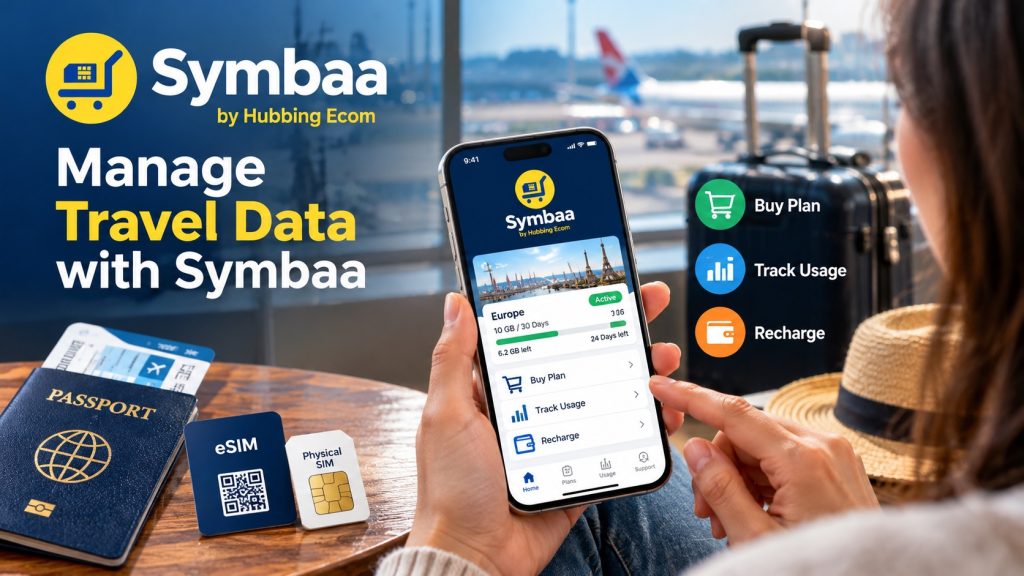
Additionally, travelers can review data balance, plan details, and recharge status through the Symbaa Application. A physical data card also helps travelers without compatible eSIM phones. Before departure, confirm phone compatibility, install carefully, save support details, and test every essential app.
Download Symbaa
1. Does a VPN work with an eSIM while traveling abroad?
Yes, because the VPN uses whichever internet connection your phone provides. First, connect the travel eSIM to mobile data. Then open a website without the VPN. Finally, enable the VPN and choose a nearby server. This sequence confirms VPN with travel eSIM operation clearly.
2. Can I use a VPN with an international travel eSIM?
Usually, yes. Consumer VPN apps operate above the mobile connection, so the SIM format rarely matters. However, network rules, destination laws, and provider routing can affect results. Good eSIM VPN compatibility requires active data, correct settings, and a reachable VPN endpoint.
3. Why is my VPN not working with my travel eSIM?
First, determine whether mobile data works without the VPN. If it does, change the VPN server or protocol. Also, inspect the kill switch and DNS settings. If data also fails, eSIM VPN not working likely reflects APN, roaming, coverage, or plan problems.
4. Does using a VPN affect eSIM internet speed?
Yes, encryption and server routing may add latency or reduce throughput. However, results vary with signal, congestion, protocol, and server distance. For better eSIM internet speed with VPN, choose a nearby server. Moreover, use an efficient protocol and test under stable network conditions.
5. Can a VPN cause eSIM mobile data connection problems?
A failed tunnel, strict kill switch, bad DNS, or blocked protocol can stop traffic. Still, the VPN usually does not damage the eSIM profile. When you suspect VPN affecting eSIM connection, disable the VPN briefly. Then test ordinary mobile browsing before editing cellular settings.
6. How to fix VPN connection issues with travel eSIM?
Start by testing mobile data without the VPN. Next, reconnect, select a nearer server, and change protocols. Then restart the phone and update the app. If Travel eSIM VPN issues continue, check APN, DNS, roaming, battery restrictions, and competing VPN profiles.
7. Does a VPN interfere with eSIM activation or installation?
Usually, the VPN does not alter eSIM installation. However, activation may need reliable Wi-Fi or cellular access. Therefore, pause the VPN if the provider’s app or activation page fails. Apple advises maintaining an available internet connection during eSIM setup on supported iPhones.
8. Can I use NordVPN or ExpressVPN with a travel eSIM?
Generally, both services can run through mobile data. However, no provider guarantees every server on every network. If a VPN with travel eSIM fails, try another server and protocol. NordVPN and ExpressVPN both recommend those troubleshooting steps for connection or speed problems.
9. Why does my eSIM internet stop working when VPN is enabled?
The kill switch may block traffic when the encrypted tunnel fails. Alternatively, DNS requests or the selected VPN server may fail. Disable the VPN briefly, verify mobile data, and reconnect elsewhere. This test separates VPN affecting eSIM connection symptoms from actual eSIM service faults.
10. Does using a VPN consume more eSIM mobile data?
Yes, a VPN normally adds modest overhead through encryption and packet wrapping. Moreover, automatic reconnections may create extra traffic. Monitor cellular usage through your phone and Symbaa Application. Also, avoid unnecessary streaming or cloud backups when your eSIM plan has limited data.
11. Can I use a VPN with eSIM on iPhone and Android?
Yes, both platforms support VPN apps and cellular data. On iPhone, choose the eSIM as your data line. Meanwhile, Android users should permit mobile data and unrestricted background activity. These steps support stable eSIM internet speed with VPN and fewer unexpected disconnections.
12. Does travel eSIM work with VPN in China and Russia?
Technically, some connections may work, but local law and blocking create serious limits. Therefore, never assume access. Check current government travel advice before departure. In China and Russia, approved services, company policies, and enforcement may differ from ordinary tourist expectations.
13. Can I use a corporate VPN with an international eSIM?
Often, yes. However, corporate VPNs may require specific ports, certificates, DNS, or IP ranges. Ask your IT team for mobile-network guidance before travel. If the tunnel fails, test another network and approved protocol. Never weaken company security controls without written authorization.
14. Does VPN change the IP address of my travel eSIM?
The VPN changes the public IP address that websites usually see. However, it does not rewrite the eSIM identity or phone number. Additionally, apps may use GPS, cookies, or account regions. Therefore, a changed IP alone never guarantees complete location masking.
15. How to troubleshoot eSIM VPN DNS and APN issues?
First, restore the provider’s correct APN and test data without VPN protection. Next, remove custom DNS temporarily and reconnect. Never guess APN values, because one wrong field can block service. If problems remain, contact your eSIM provider and VPN support separately.
16. Can a VPN delete or damage my travel eSIM?
No, an ordinary VPN app cannot delete the installed eSIM profile. It only routes internet traffic through an encrypted tunnel. However, a full network reset may remove VPN settings. Always avoid selecting “Delete All eSIMs” while troubleshooting an iPhone network problem.
17. Should I activate the eSIM before enabling my VPN?
Yes, this order simplifies diagnosis. First, install and activate the travel eSIM using reliable internet. Then confirm mobile data at your destination. Finally, enable the VPN. If eSIM VPN not working appears later, you already know the underlying eSIM previously connected correctly.
18. Which VPN server should travelers choose?
Choose a nearby server unless you need a particular country. Nearby servers usually reduce routing distance and latency. However, server congestion can still affect performance. Therefore, test two nearby options. This simple approach often improves eSIM internet speed with VPN without changing cellular settings.
19. Should I use a VPN kill switch abroad?
A kill switch protects traffic when the VPN drops. However, it can make functioning mobile data appear broken. Keep it enabled for sensitive work, but understand its behavior. During diagnosis, pause it briefly, test connectivity, then restore protection after repairing the tunnel.
20. When should I contact Symbaa or VPN support?
Contact Symbaa support when mobile data fails without the VPN, or plan details look incorrect. Contact VPN support from where you bought when data works normally, yet the tunnel repeatedly fails. For eSIM Data not working–Share your phone model, country, local network, error message, and completed tests helps either team respond faster. WhatsApp your device model, country visibited, iccid number, date of issue to +91-9508041583
You may like reading similar Blogs
How to Turn Off ‘Allow Mobile Data Switching’ to Stop Surprise Carrier Roaming Bills
eSIM for the First Time: A Complete Beginner’s Step-by-Step Setup Guide
Why Does My eSIM Have Full Signal Bars but No Internet? 7 Underlying Fixes
Is Your Phone eSIM Compatible? Check in 60 Seconds
Never Delete Your Travel eSIM: What Happens When You Tap ‘Delete eSIM’ & How to Recover
eSIM vs Pocket WiFi vs International Roaming: Which Is Best for Your Trip in 2026?
Day Pass, Unlimited or Fixed Data eSIM: Which Plan Is Best for Your Trip?
How to Keep Your WhatsApp Number Active While Using a Travel eSIM
Should I Install My eSIM Before Travel or After Landing? The Complete Answer
eSIM for Short Layovers and Airport Transit: Do You Really Need Data for 2–6 Hours?
Best eSIM,Physical SIM for Southeast Asia: Nepal, Sri Lanka, Philippines, Bali Compared
eSIM for Digital Nomads and Remote Workers: The Complete Connectivity Setup in 2026
eSIM Security and Privacy: Is Your Data Safe When Traveling?
Subscribe to our YouTube channel and follow us on Instagram for more updates.
About the Author
Swatantra Ranjan is a telecom professional with over 15 years of experience in the global telecommunications industry having worked in India & Dubai, specializing in eSIM solutions, voice services, SMS, international roaming, Direct Inward Dialing (DID) numbers, virtual numbers, and sales/services experience in B2C/B2B banking industry. Having traveled to more than 20 countries, he combines deep technical expertise with firsthand international travel experience to create practical, accurate, and trustworthy content on global connectivity, mobile technology, and travel communications. His articles help travelers, businesses, and telecom professionals make informed decisions about staying connected efficiently and securely across the world. Check out LINKEDIN Profile

Leave a comment