

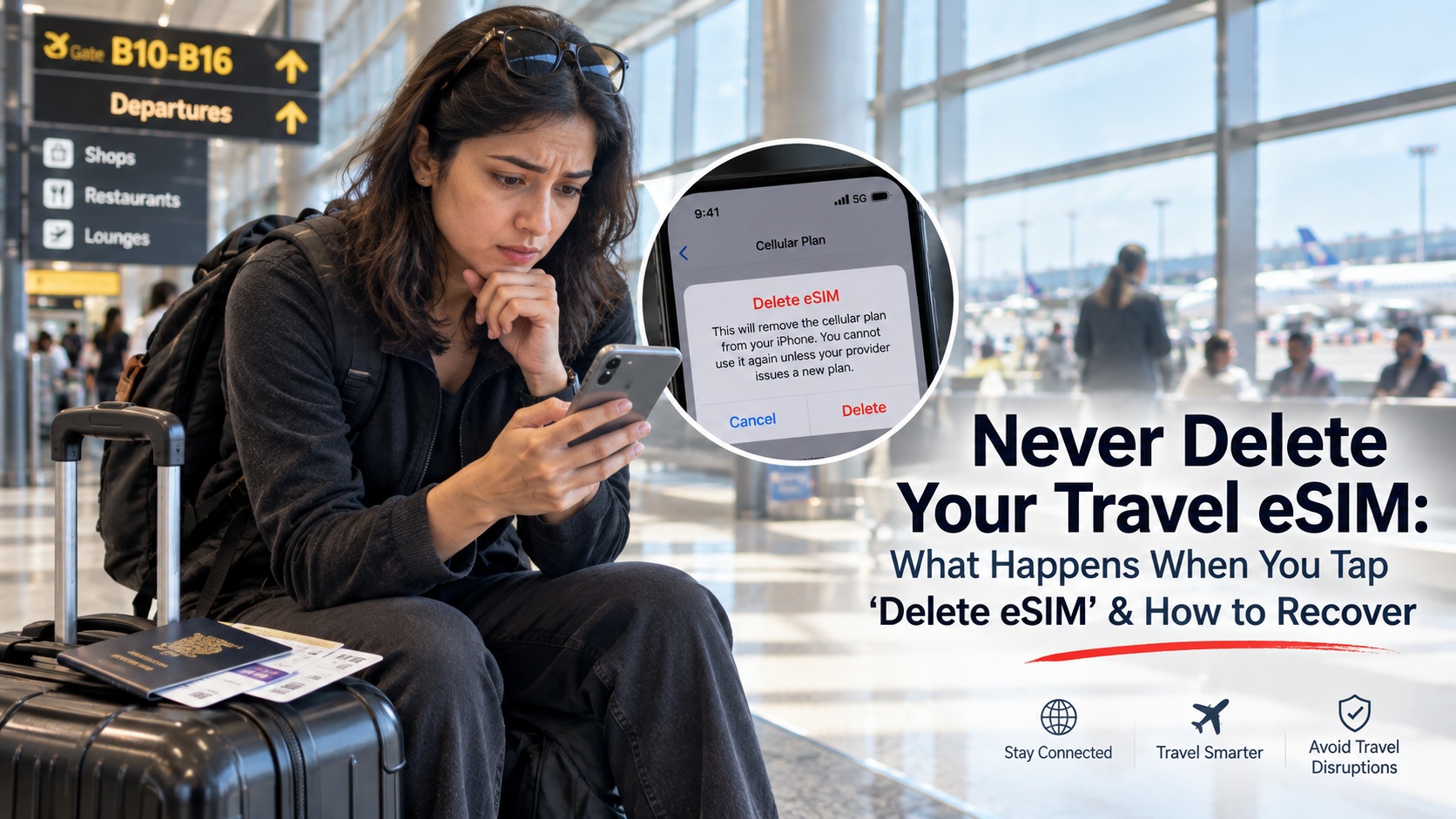
Imagine landing at an international airport, excited to explore a foreign city. You turn on your smartphone, but your travel data feels sluggish. Frustration mounts as web pages stall and navigation maps refuse to load properly. Seeking a quick solution, you open your cellular settings menu.
You see the red prompt labeled “Delete eSIM” or “Remove Cellular Plan.” Assuming it acts like deleting a faulty smartphone app, you tap it. You plan to scan your confirmation email’s QR code again immediately.
Unfortunately, you just triggered a permanent digital lockout. Your screen displays an error reading “QR Code No Longer Valid” or “Code Already In Use”. You cannot get online, and your paid data appears completely gone.
This nightmare scenario happens to thousands of international travelers every single week. You must never delete travel eSIM profiles simply to troubleshoot routine network issues abroad.
Understanding what happens if I delete an eSIM helps you protect your investment. Learn how to safeguard your connection, protect your data, and explore recovery steps below.
The Fatal Tap: Why Travelers Delete Their eSIM During a Glitch
Never tap “Delete eSIM” to fix a connection glitch. Deleting an eSIM erases the cryptographic certificate from your phone’s hardware chip forever. Because travel QR codes are single-use tokens, you cannot scan them a second time. Instead, toggle the line off and on.
When mobile internet stalls abroad, travelers often apply desktop computer troubleshooting logic. They assume reinstalling a cellular profile works just like reinstalling a frozen mobile application. However, telecommunication architecture operates under vastly different technical rules than software apps.
NOTE: Consider visiting our YouTube Channel for detailed discussion on eSIM Technology and more.
The False Analogy: Why an eSIM Is Not Like a Smartphone App
When you delete an application, you simply remove software files from storage. You can freely re-download that application from digital app stores anytime without penalties. A digital subscriber identity profile, however, represents a secure virtual hardware credential.
It contains encrypted security certificates provisioned directly onto an embedded physical microchip. When you tap delete, your operating system permanently wipes those cryptographic keys. Your device forgets the authentication handshake required by foreign cellular towers completely.
What Actually Happens to Your Plan Balance in the Cloud
Many panic-stricken travelers assume deleting the profile instantly erases their purchased gigabytes. Fortunately, your actual financial account balance does not reside on your physical smartphone. Your purchased gigabytes remain safely registered on the telecom provider’s central billing servers.
However, your handset has severed the cryptographic key required to access that data pool. The server recognizes that your data package remains active and fully paid. Yet, your smartphone can no longer establish an authorized cellular connection to reach it.
The Golden Rule: "Turn Off This Line" vs. "Delete eSIM"
Every smartphone user must learn the vital difference between disabling and deleting profiles. Confusing these two distinct software options causes avoidable travel disasters worldwide every day.
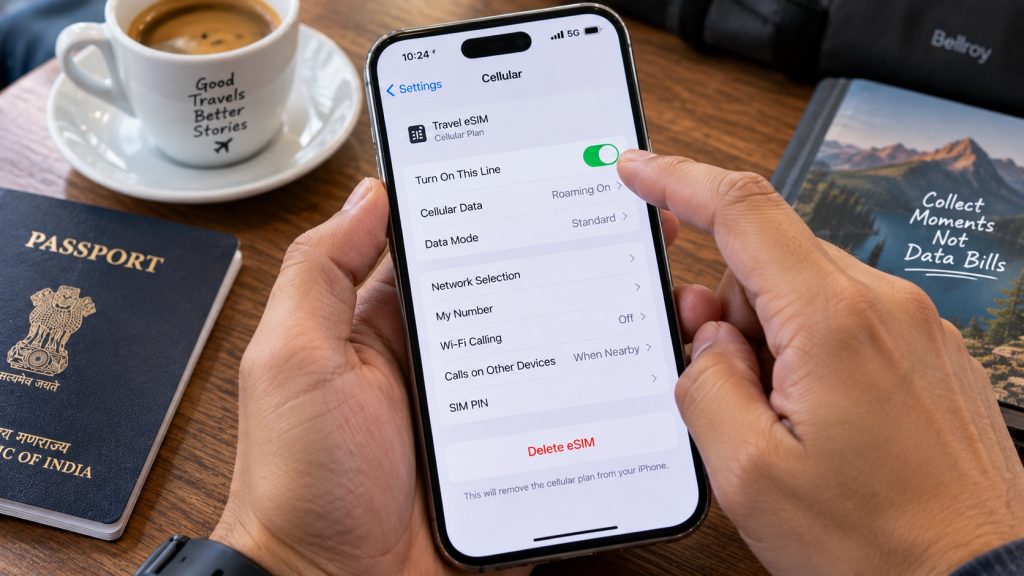
Turning Off a Line: The Safe, Reversible Sleep Mode
Toggling a cellular line off simply places the digital profile into standby. Your phone stops broadcasting radio signals to nearby local cell towers temporarily. However, all underlying network access point configurations and security certificates remain intact.
You can toggle the line back on two seconds later without friction. The device instantly re-authenticates with local cell towers and restores internet access smoothly. This simple toggle represents the correct method to refresh sluggish foreign network connections.
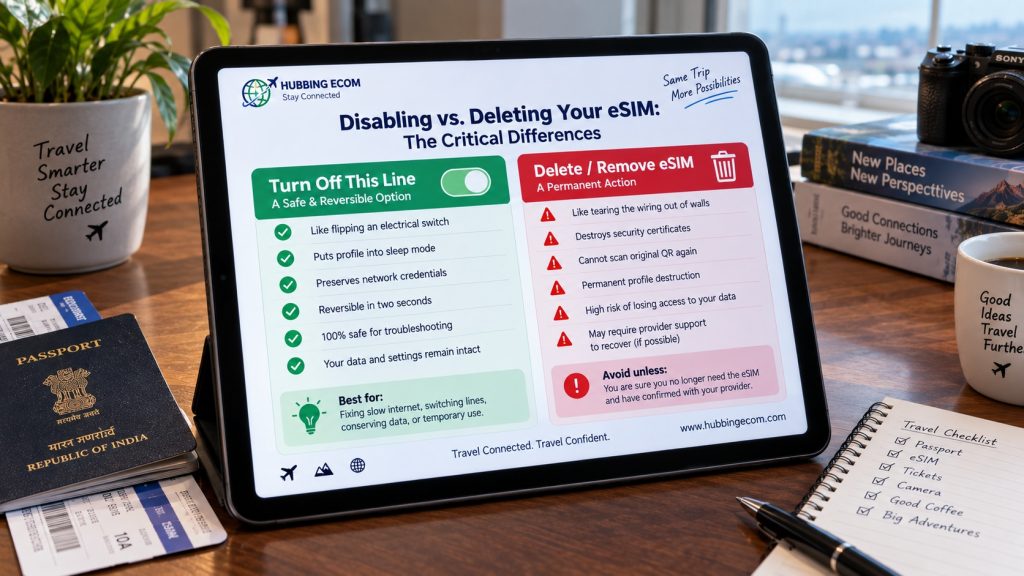
Deleting an eSIM: Tearing the Digital Wiring Out of Your Phone
Tapping delete does not place your travel profile into a resting state. Instead, it commands your phone’s hardware chip to destroy its localized security keys. Think of disabling as flipping a room light switch off safely.
Conversely, tapping delete tears the copper wiring out of your walls entirely. Once destroyed, flipping the switch back on produces absolutely zero response or power. You must never choose the delete option while actively traveling overseas.
NOTE: Consider visiting our YouTube Channel for detailed discussion on eSIM Technology and more.
The Single-Use QR Code Trap: Why You Cannot Re-Scan It
The most common question from panicked flyers is: can I rescan eSIM QR code images from my email? The short, definitive answer for almost every travel provider is an absolute no.
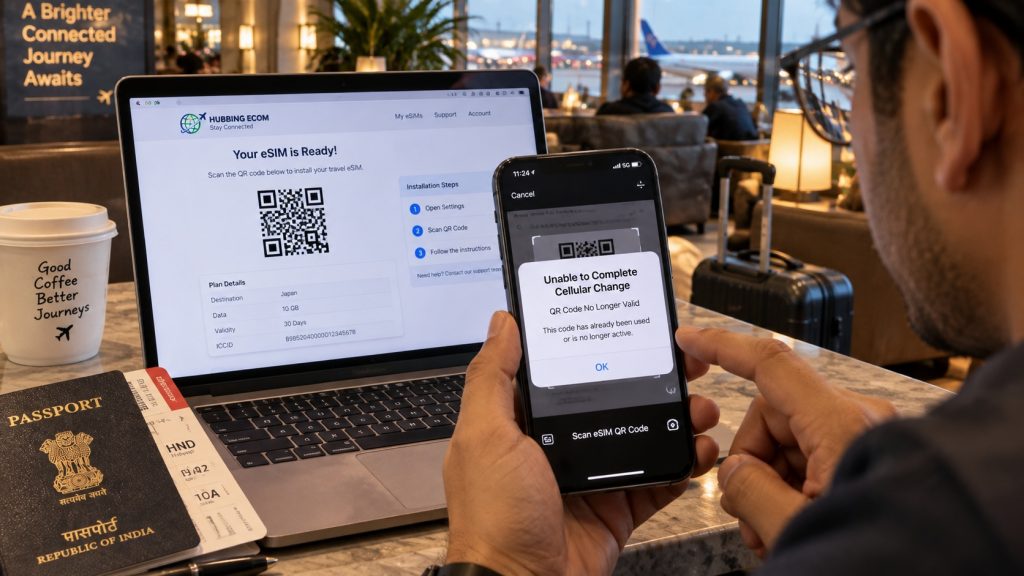
The diagram below illustrates how one-time Remote SIM Provisioning works. Once the central SM-DP+ server releases your encrypted profile, your activation token is permanently marked as redeemed. If you keep the profile, your data remains fully operational and safe to toggle off anytime. However, if you tap “Delete,” those local cryptographic keys are wiped immediately, and the burned server token will reject any attempt to re-scan the original QR code.
NOTE: Consider visiting our YouTube Channel for detailed discussion on eSIM Technology and more.
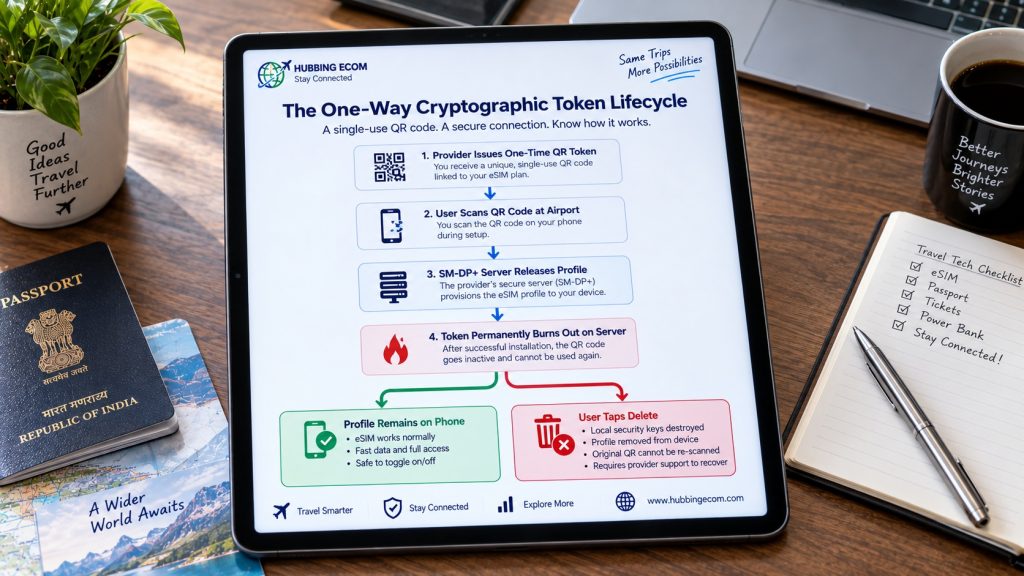
The Cryptographic Handshake: How SM-DP+ Servers Burn Tokens
Travel providers deliver cellular profiles via a GSMA protocol called Remote SIM Provisioning. When you purchase data, an SM-DP+ (Subscription Manager Data Preparation) server creates a profile. The activation QR code acts as a single-use authorization token.
When your camera scans that barcode, your phone contacts the server securely. The server verifies the token, transfers the encrypted profile, and burns the token immediately. This critical security safeguard prevents one purchased plan from being cloned across multiple phones.
Deciphering the "QR Code No Longer Valid" Error Message
When you scan a previously used activation barcode, your device requests the profile again. However, the central SM-DP+ server immediately rejects the incoming cryptographic handshake. The server recognizes that the specific authorization voucher has already been redeemed.
Consequently, your smartphone displays frustrating error messages like “Unable to Complete Cellular Change.” You cannot force the camera to bypass this strict carrier-grade security wall. At this point, travelers realize their original installation voucher has expired permanently.
The Disaster Scenario: Accidentally Deleting Your Domestic Home Line
While losing travel data causes headaches, deleting your primary domestic carrier profile creates catastrophic problems. Many modern smartphones hold both your home line and your travel line digitally. In a rush, distracted travelers often tap the wrong menu item and wipe their home line.
Losing Inbound Bank OTPs and UPI Verification Abroad
Deleting your domestic home line cuts your connection to your home telecom provider entirely. You instantly lose the ability to receive free incoming SMS messages and verification passcodes. Essential banking platforms, credit cards, and flight booking portals rely strictly on incoming two-factor SMS texts.
Furthermore, Unified Payments Interface apps like Google Pay and PhonePe rely on active SIM binding. Once you erase your domestic card, those financial applications lock you out completely. You cannot easily verify financial payments or transfer funds while standing at foreign checkouts.
How to Prevent Domestic Carrier Identity Loss While Traveling
Recovering a domestic carrier profile like Jio, Airtel, or AT&T while overseas is exceptionally difficult. Most domestic carriers require physical biometric verification or domestic SMS confirmation to re-issue digital profiles. Therefore, you must label your cellular profiles clearly inside your phone settings menu.
Label your primary home line explicitly as “Home Line – Do Not Touch.” Label your temporary international data profile as “Travel Data Line” to prevent confusion. This clear visual distinction protects you from catastrophic accidental deletions during late-night troubleshooting sessions.
Provider Reinstallation Comparison: Who Lets You Recover?
Different international data retailers enforce vastly different operational policies regarding accidental profile deletions. Some flexible vendors provide automated reinstallation tools, while rigid providers force travelers to forfeit their money.
We compared the top consumer providers on how they treat deleted digital profiles. The benchmark table below illustrates the reinstallation rules across major global travel cellular brands.
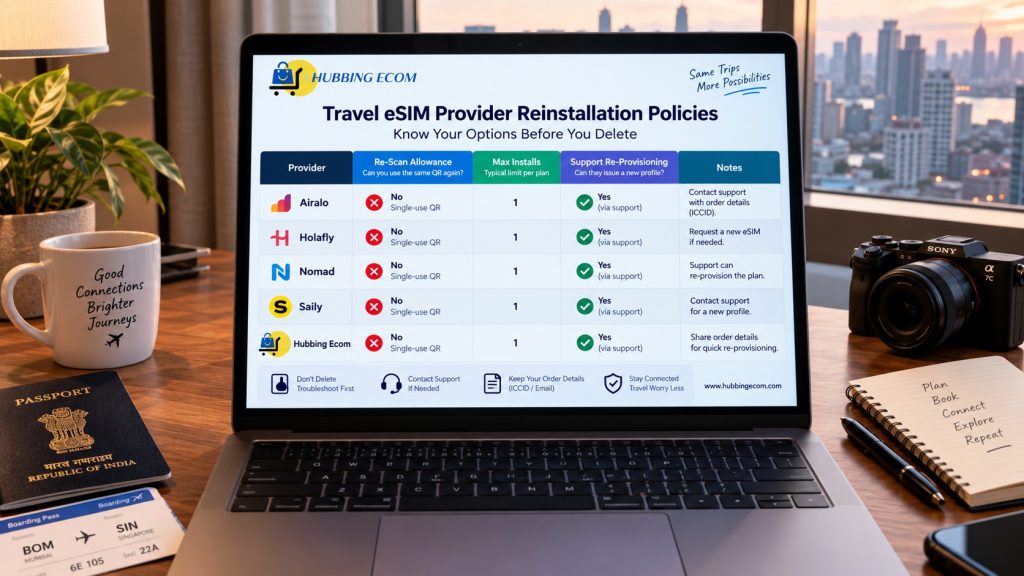
Reinstallation Policies: Airalo, Holafly, Nomad, Saily, and Hubbing ECom
Airalo enforces strict single-use token policies on most regional and local country profiles. If you delete an Airalo profile, you generally lose all remaining data completely. You must purchase, download, and activate an entirely new package to restore service.
Conversely, Holafly allows travelers to reinstall the same profile up to four times on one phone. Saily links digital profiles directly to your user account, allowing simple app-based profile restores.
Nomad generally treats installation codes as single-use, but select upstream partners permit re-scans. Hubbing ECom provides robust consumer protection by offering automated profile re-issuance via your central customer dashboard.
Why Some Providers Force You to Buy a Duplicate Plan
Budget providers often refuse profile replacements because their wholesale carrier contracts charge them per activation. Every time an SM-DP+ server generates a new cryptographic certificate, wholesale licensing fees apply.
Low-cost retailers pass that financial penalty directly onto consumers by denying free profile replacements. High-tier providers absorb these backend infrastructure costs to ensure superior customer satisfaction and stress-free international travel.
The 4-Step Emergency Recovery Protocol: How to Restore Connectivity
If you already tapped delete by mistake, do not panic or immediately purchase duplicate plans. Follow our proven eSIM single-use QR code recovery protocol to get back online smoothly.
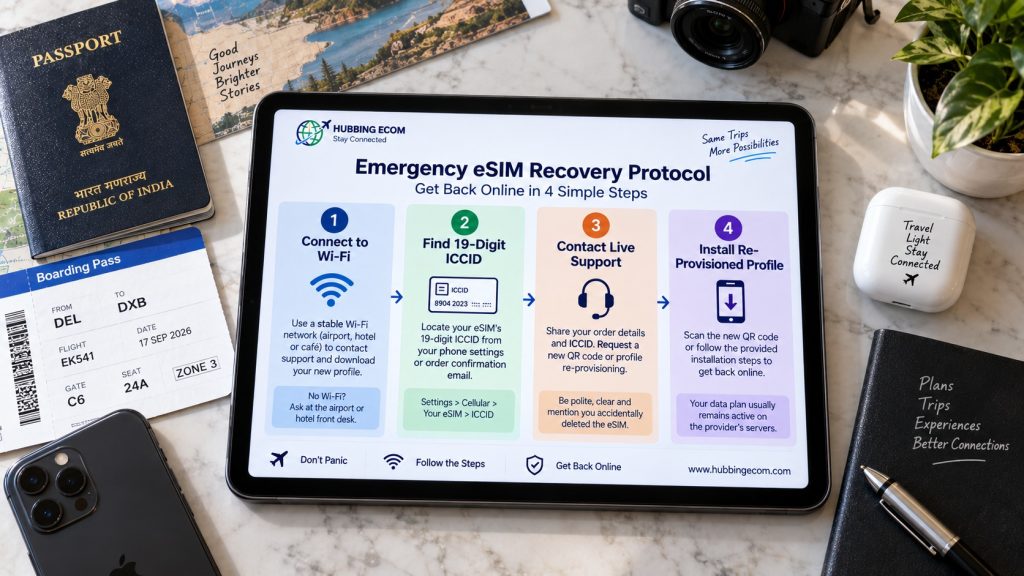
Step 1: Connect to Secure Wi-Fi and Retrieve Your Order Receipt
You cannot communicate with cellular support or download digital profiles without an active internet connection. Find a stable Wi-Fi network inside your airport terminal, hotel lobby, or a nearby cafe.
Once connected, open your email inbox and search for your original purchase confirmation message. Keep your order number, confirmation invoice, and transaction details open on your smartphone screen.
Step 2: Locate Your Unique 19-Digit ICCID Number
Every digital cellular line possesses an international identifier known as an ICCID number. This nineteen-digit serial code acts as the social security number for your specific cellular profile.
You can find this unique identifier printed clearly on your original purchase invoice or provider receipt. Customer support engineers require this exact sequence to locate your active unspent data balance upstream.
Step 3: Contact Support Using the "Accidental Deletion" Script
Open your provider’s mobile application or website live chat tool to speak with support personnel. Do not simply state that your internet stopped working, as that triggers generic troubleshooting scripts.
Instead, provide your exact order number, your nineteen-digit ICCID, and your specific smartphone hardware model. State clearly: “I accidentally deleted my active profile from my original device. The device hardware is unchanged. Please reset my SM-DP+ token or issue a replacement profile against this order.”
Step 4: Install the Re-Provisioned Profile via Manual Activation
Once support resets your server credentials, they will issue an updated activation QR code or code string. Avoid scanning from reflective screens if your phone struggles to read the physical barcode.
Instead, choose manual activation within your device settings and paste the SM-DP+ address and activation code. Your phone will contact the provisioning server, download fresh cryptographic certificates, and restore your connection.
Device Management Matrix: Safe Actions for iPhone & Android
Follow this operational reference matrix to manage your smartphone connections safely while traveling abroad:
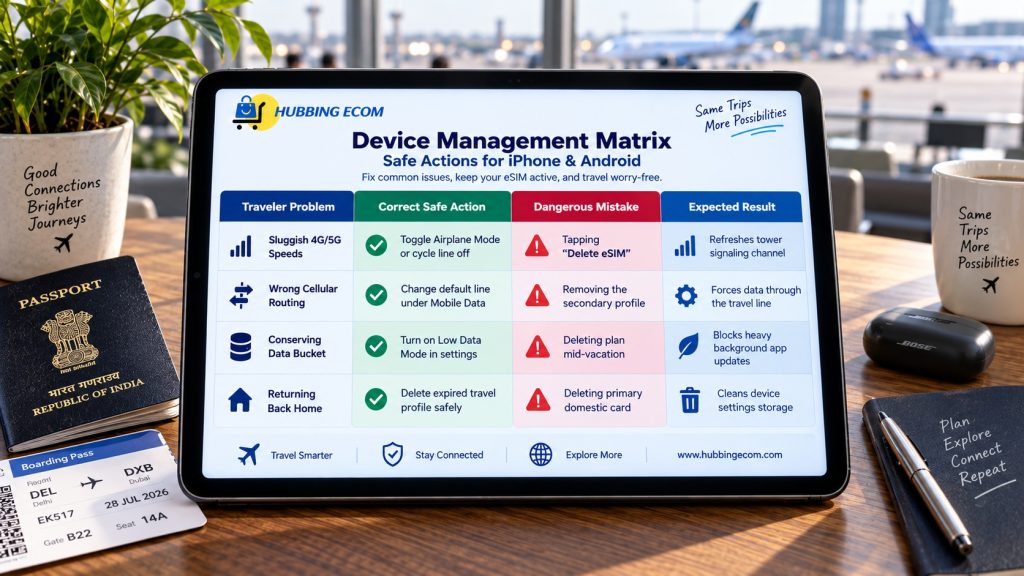
Frequently Asked Questions (FAQs)
No, in almost all circumstances you cannot re-scan an original travel activation QR code. Travel QR codes represent single-use cryptographic authorization tokens that expire immediately upon initial download. Re-scanning triggers an immediate invalid token error message on your device screen.
No, deleting a digital profile from your hardware handset does not cancel your cellular plan. Your account balance and plan validity remain fully active on the provider’s central cloud servers. Furthermore, deleting a plan does not trigger an automatic financial refund from your provider.
Turning off an eSIM simply puts the digital line into a safe, dormant sleep state. You can reactivate the line two seconds later without losing stored network configurations. Deleting an eSIM completely destroys its cryptographic certificates, permanently severing your device from that cellular connection.
Do not panic, but connect to a reliable Wi-Fi network immediately. Open your home carrier’s official mobile account application and check for digital profile transfer options. If your carrier requires physical SMS authentication, you must contact their international roaming helpline immediately for assistance.
Yes, reputable providers like Hubbing ECom can re-provision a fresh profile for your unspent data. You must provide your original purchase invoice and your nineteen-digit ICCID number to help desk agents. The support team can then generate a new cryptographic token for your handset.
You May Like Reading Similar Blogs
Why Does My eSIM Have Full Signal Bars but No Internet? 7 Underlying Fixes
eSIM vs Pocket WiFi vs International Roaming: Which Is Best for Your Trip in 2026?
Day Pass, Unlimited or Fixed Data eSIM: Which Plan Is Best for Your Trip?
Best eSIM for Indian Travelers Going Abroad: Complete 2026 Guide
How to Keep Your WhatsApp Number Active While Using a Travel eSIM
Top 15 Things to Do in Langkawi
Should I Install My eSIM Before Travel or After Landing?
eSIM for Short Layovers and Airport Transit: Do You Really Need Data for 2–6 Hours?
eSIM for Digital Nomads and Remote Workers
eSIM Security and Privacy: Is Your Data Safe When Traveling?
Best eSIM, Physical SIM for Southeast Asia: Nepal, Sri Lanka, Philippines, Bali Compared
Best Asia eSIM for Indians, NRIs and International Tourists: Travel Across 20 Plus Countries
Affordable eSIM for Singapore: Safe High‑Speed Data for International Tourists
Is ‘Unlimited’ eSIM Really Unlimited? The Truth About Throttling & Hidden Data Limits
How Much eSIM Data Do I Really Need? A Calculator for Every Type of Traveler
Complete eSIM Troubleshooting Guide — Why It’s Not Working & How to Fix It
How to check eSIM Data usage on iPhone?
Why you should use eSIM and Wi-Fi Map in conjunction? On your international trip..
Subscribe to our YouTube channel and follow us on Instagram for more updates.
Leave a comment