

Landing in a foreign airport without working communication creates instant panic for modern international travelers. You desperately need affordable mobile data to order a cab, navigate public transit, and find your accommodation.
However, you also need to stay in touch with your family, coworkers, and client groups back home. Many travelers worry that activating a travel data plan will instantly erase their personal chat history.
Fortunately, modern smartphone hardware allows you to separate your cellular data from your messaging identity completely. You can easily keep WhatsApp number with travel eSIM profiles active simultaneously on almost any recent mobile device.
This comprehensive guide shows you how to configure your smartphone for seamless global messaging. Follow these exact steps to stay connected, protect your financial security, and travel abroad with total peace of mind.
Does a Travel eSIM Change Your WhatsApp Number?
Fast-Answer: No. Installing a travel eSIM never changes your WhatsApp number automatically. WhatsApp links directly to your initial account registration, requiring only an active internet data stream to send and receive messages.
The Difference Between Your Account Identity and Data Connection
Many travelers wonder: does eSIM change WhatsApp number settings when activated abroad? The simple answer is an absolute, unconditional no.
WhatsApp treats your phone number as a permanent digital identity token during initial setup. It verifies your number once through SMS when you first launch the app on your phone.
After that initial verification step, WhatsApp views your cellular network simply as an open data pipe. The application does not care whether your internet comes from hotel Wi-Fi, home data, or an eSIM.
Therefore, your mobile provider and your messaging platform operate as two completely independent software systems. You can use home SIM for WhatsApp travel eSIM data routing without losing your verified account status.
What Happens to Your Chats, Media, and Contact Lists?
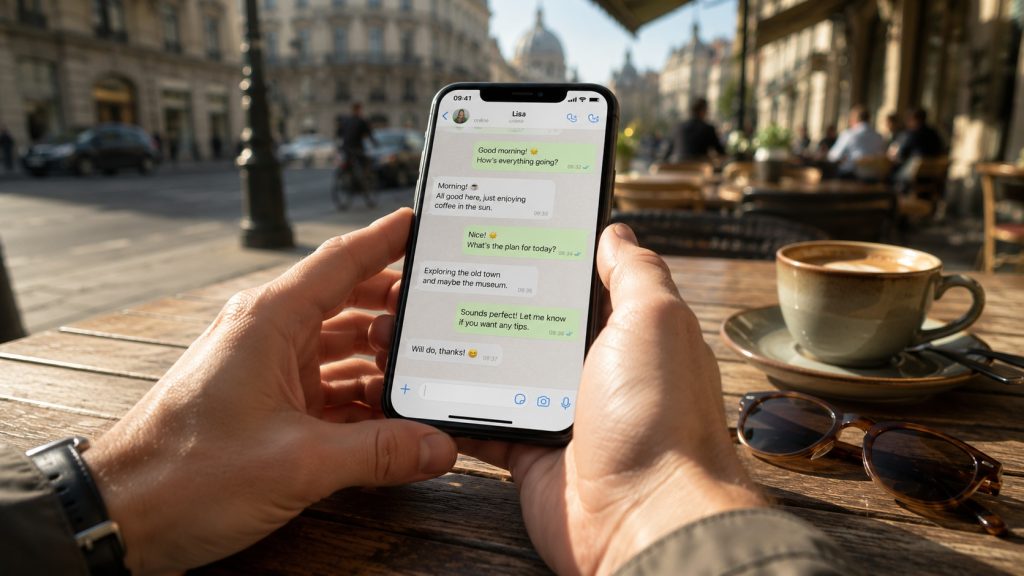
Your entire messaging ecosystem remains untouched on your local phone storage when switching networks. Every single private conversation, group chat, archived thread, voice note, and shared photograph stays right where you left it.
Furthermore, your contacts will never notice any technical transition on their end. When your friends and colleagues send messages, texts arrive at your original, familiar number without delays.
Outgoing voice calls and media uploads will also display your standard profile name and picture. You can safely utilize high-speed data anywhere in the world while preserving your established digital footprint.
How to Configure Dual-SIM for WhatsApp Abroad (Step-by-Step)
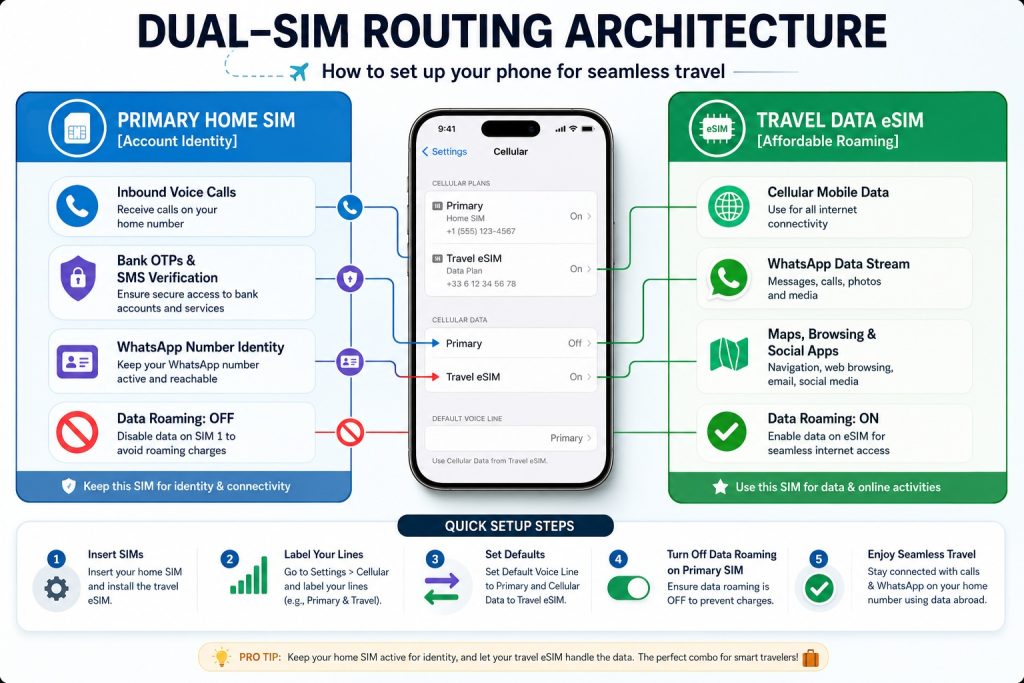
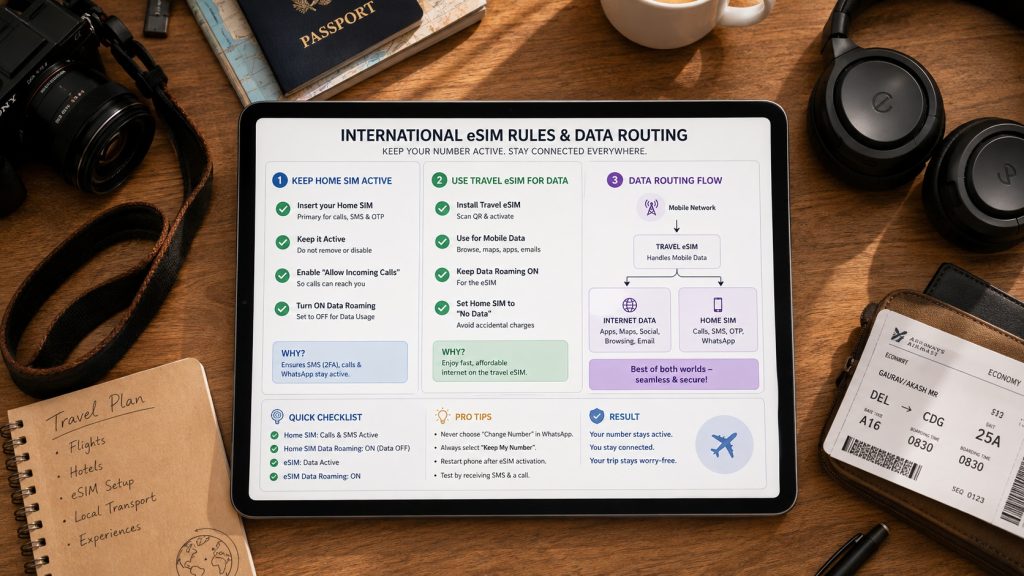
Configuring dual SIM WhatsApp settings international travel rules correctly ensures you never incur accidental carrier fees. Modern operating systems allow you to assign specific tasks to individual mobile lines cleanly.
You should always configure your smartphone before stepping onto your international flight. Let us examine the exact setup instructions for Apple, Samsung, and Google smartphones below.
Note: Explore our YouTube channel — from step‑by‑step technical setup videos to immersive travel stories.
Setting Up iPhone (iOS 17 & iOS 18)
Setting up your Apple smartphone takes less than two minutes inside your primary configuration menu. Follow these exact steps to lock in your dual-SIM setup safely:
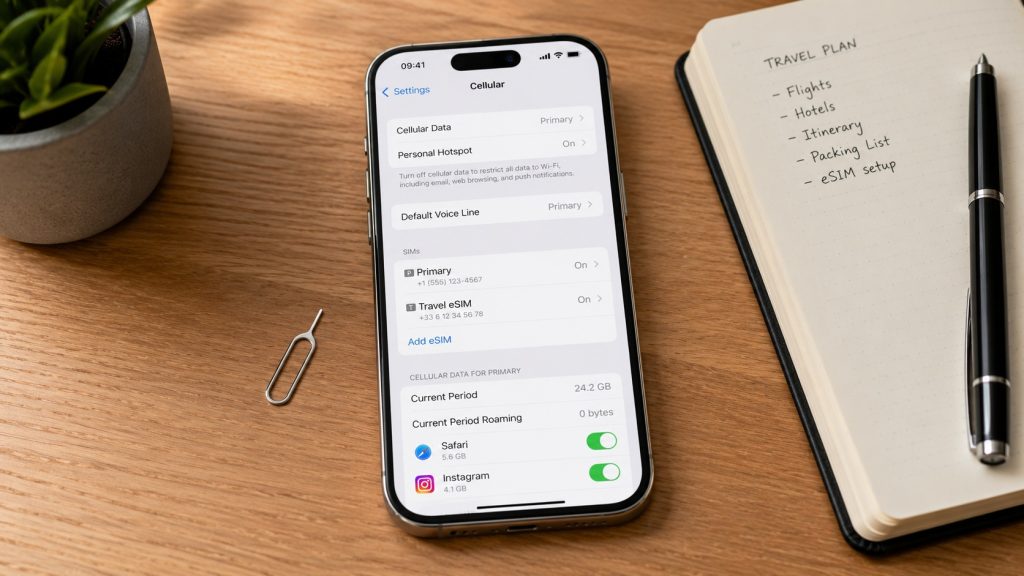
- Open Settings on your iPhone and select Cellular (or Mobile Service).
- Turn on your primary physical card and your newly installed digital travel profile.
- Tap Cellular Data at the top and select your newly added travel eSIM line.
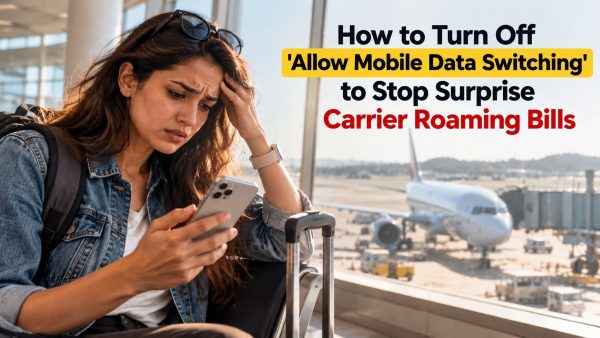
- Toggle off Allow Cellular Data Switching to prevent expensive home data leaks.
- Tap your primary domestic line, scroll down, and ensure Data Roaming is turned OFF.
- Return to the main menu, tap your travel eSIM line, and toggle Data Roaming to ON.
Setting Up Samsung Galaxy (One UI)
Samsung devices use a dedicated management menu to control multiple cellular subscriptions easily. Adjust your Samsung SIM card manager keep WhatsApp active travel eSIM preferences using these quick actions:
- Open Settings and tap directly on Connections, then select SIM Manager.
- Ensure both your primary physical card and secondary travel eSIM toggles show active status.
- Under the Preferred SIMs section, tap on Mobile Data and pick your travel eSIM.
- Set your primary home carrier line as the default option for Calls and Messages.
- Return to Connections, tap Mobile Networks, and turn off Data Roaming for your home slot.
Note: Discover our YouTube channel for step‑by‑step eSIM setup on Samsung, Xiaomi, and Motorola, along with a wide range of technical and travel videos.
Setting Up Google Pixel (Stock Android)
Stock Android features clean, intuitive controls for organizing personal mobile networks while commuting abroad. Configure your Google Pixel travel eSIM data WhatsApp primary number parameters with this workflow:
- Open your main Settings application and choose Network & Internet, then tap SIMs.
- Select your installed travel eSIM and toggle Use SIM to the active position.
- Tap Mobile Data under your travel profile to route all browsing traffic through this connection.
- Enable Roaming specifically on the travel eSIM menu to unlock local carrier tower access.
- Select your domestic home line and verify that its individual Roaming toggle remains completely disabled.
How to Receive Bank OTPs and SMS Abroad Without Roaming Fees
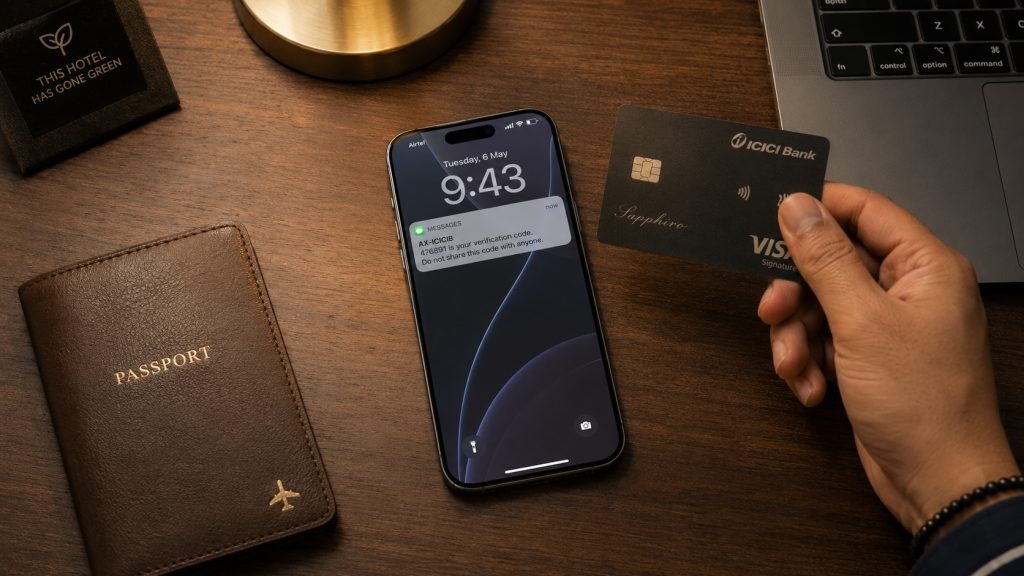
One of the biggest concerns for outbound travelers is maintaining access to critical authentication codes. International banks, credit cards, and government portals rely heavily on SMS-based two-factor authentication.
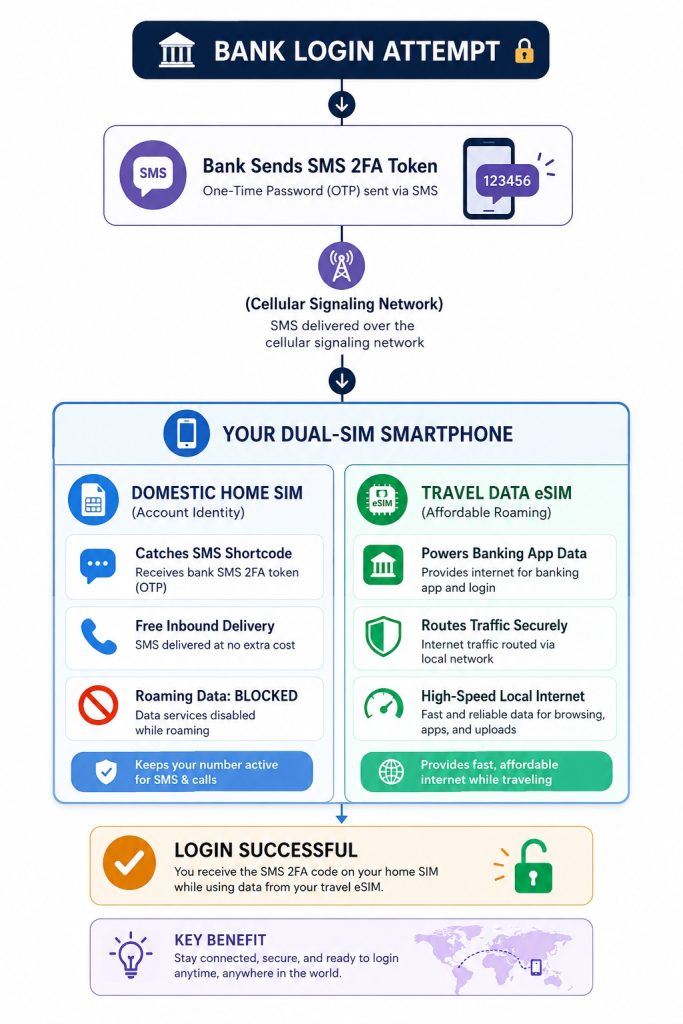
Fortunately, a dual-SIM smartphone lets you receive bank OTP abroad eSIM configurations without spending extra cash. You just need to configure how your primary domestic carrier handles incoming text messages abroad.
Why Inbound SMS Is Usually Free While Roaming
Most global telecom operators allow customers to receive incoming standard text messages abroad at zero additional cost. Carriers charge expensive international fees for outgoing phone calls, sent text messages, and cellular internet consumption.
However, inbound routing signals carry tiny data packets that pass through international partner networks without billing triggers. This means you can keep WhatsApp number with travel eSIM setups while receiving free incoming SMS abroad home SIM dual SIM setup codes.
For example, travelers from India can easily receive SBI HDFC ICICI bank OTP abroad on dual SIM devices safely. Just ensure your domestic prepaid or postpaid account maintains basic validity before you board your flight.
Preventing Accidental Carrier Data Leaks on Your Primary SIM
The real financial danger while traveling comes from background cellular data leakage on your primary line. If your home SIM accidentally downloads an email update abroad, your carrier might bill a daily international pass.
To eliminate this financial risk, double-check that cellular data roaming is disabled on your home line. Always verify that your travel eSIM handles one hundred percent of your device’s cellular data.
Additionally, turn off automatic network switching features across all operating systems before departing your home terminal. This protective measure keeps your domestic carrier isolated strictly to free inbound voice and text channels.
What Happens If You Remove Your Physical SIM Card Entirely?
Some budget smartphones lack dual-standby support, forcing users to remove their domestic plastic SIM card manually. Alternatively, you might decide to remove your home card to eliminate any risk of unexpected carrier charges.
It is vital to understand what happens to WhatsApp when removing physical SIM card trays during transit. Let us examine how your applications behave when your physical home subscription is sitting inside your wallet.
Why WhatsApp Continues Working on Wi-Fi and eSIM Data
WhatsApp stores a secure cryptographic authorization token directly within your smartphone’s permanent local application storage. The software does not check for a physical SIM card every time you open the interface.
As long as your device connects to the internet via your travel eSIM, WhatsApp works perfectly. You can send multimedia texts, participate in group discussions, and make crisp voice calls continuously.
This architectural design allows budget travelers to enjoy full communication capabilities without maintaining an active home network. Your friends and family can reach your standard contact profile even if your home card is disconnected.
The Hidden Risk: Re-Verification and Device Swaps
While removing your physical card is generally safe for daily messaging, it carries one notable technical vulnerability. If your phone crashes, updates unexpectedly, or logs out, WhatsApp will demand a fresh SMS verification code.
Without your physical SIM inside a connected device, you cannot receive that mandatory login text message. Consequently, you will remain completely locked out of your messaging account until you reinstall your primary card.
Furthermore, you will completely lose the ability to receive two-factor authentication codes from your banking applications. Whenever possible, keep your home line active in a dual-SIM configuration rather than ejecting it entirely.
The Most Common Mistake: The "New SIM Detected" Popup Trap
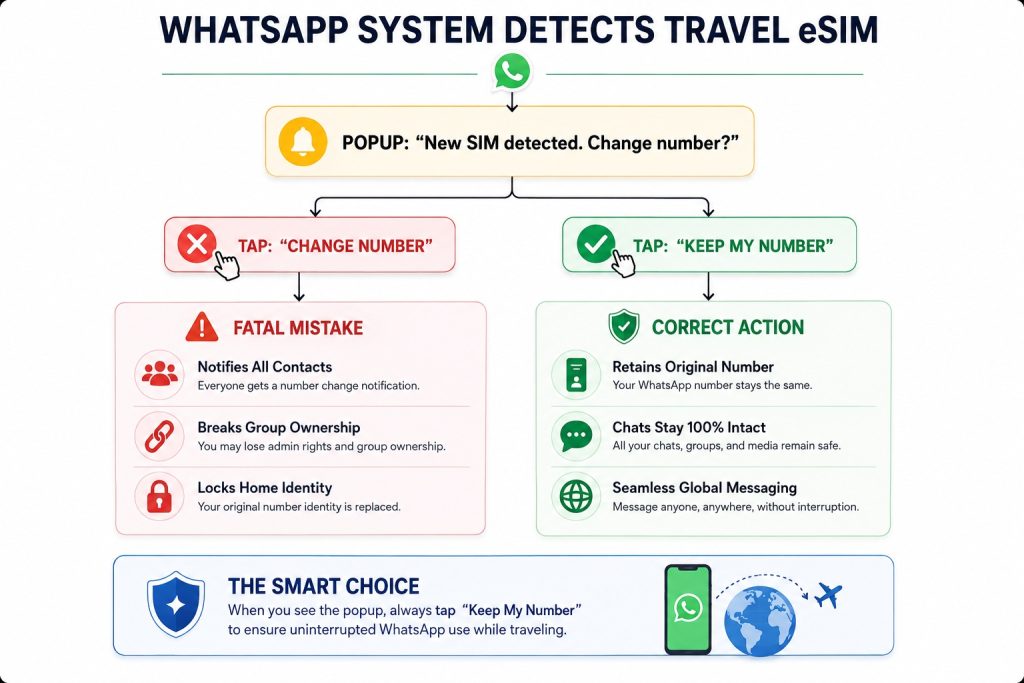
When you land and power on your travel eSIM, WhatsApp might detect a new hardware subscriber profile. The application may show a dialog box asking: “New SIM detected. Would you like to change your number?”
Understanding how to avoid accidentally changing WhatsApp number abroad scenarios will save you from major administrative headaches. Falling into this common trap is the number one reason travelers lose access to their chats.
What to Press When WhatsApp Asks to Update Your Number
If this operating system alert appears on your display, always tap “Keep My Number” or “Cancel”. Never tap the “Change Number” or “Update” button when using a temporary international travel data plan.
Most travel eSIMs are pure data lines with non-working phone numbers that cannot receive incoming text messages. If you accidentally select “Change Number”, WhatsApp will attempt to migrate your account to that temporary line.
This mistakes locks your friends out, alters your contact details in groups, and breaks your account identity. Simply dismissing the alert keeps your account anchored to your permanent home phone number safely and securely.
Enabling Two-Step Verification Before You Fly
Adding an extra layer of account security before departing prevents unauthorized profile access during international travel. Two-step verification protects your messaging history using a custom six-digit personal identification code that you create yourself.
To activate this feature, open WhatsApp, navigate to Settings, tap Account, and select Two-Step Verification. Enter a memorable six-digit PIN alongside your personal recovery email address to finalize the setup process.
This security PIN ensures that nobody can hijack your messaging identity while you swap SIM cards abroad. It guarantees smooth, uninterrupted communication throughout the entire duration of your overseas holiday or business assignment.
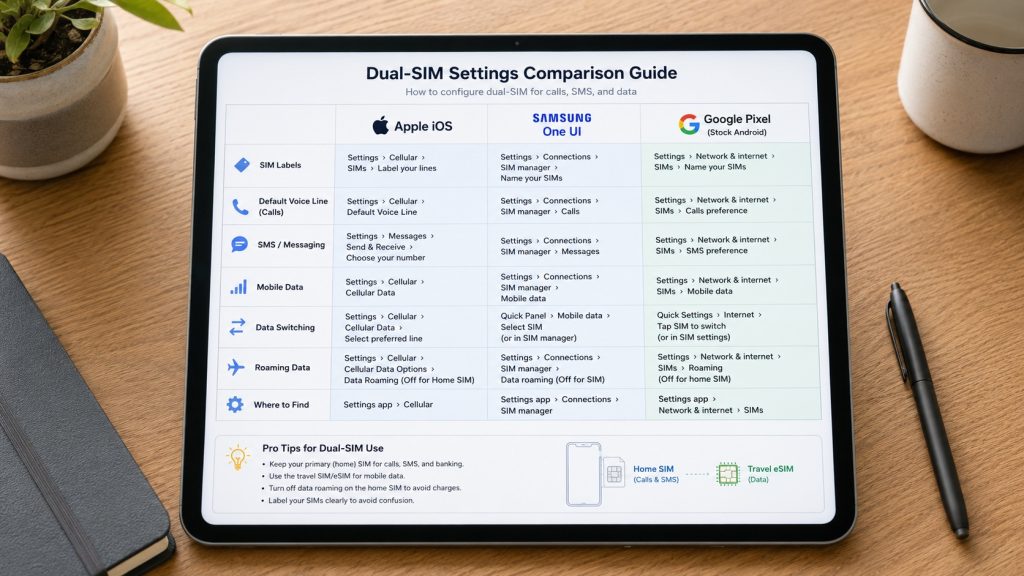
Dual-SIM Settings Quick Reference for International Travel
Use this handy reference matrix to verify your device parameters before stepping off the airplane at your destination:
Frequently Asked Questions (FAQs)
Will my contacts know I am using an international travel eSIM?
No, your contacts will not notice any difference in your messaging profile or chat threads. Because your registered WhatsApp ID remains completely unchanged, your contacts see your regular name, avatar, and phone number.
What should I do if WhatsApp asks to change my registered number?
Always choose “Keep My Number” or “Cancel” when WhatsApp detects your new travel data profile. Choosing this option protects your account identity and keeps your existing conversations running on your original domestic phone number.
Can I make regular WhatsApp voice and video calls using my travel eSIM data?
Yes, you can make unlimited voice and video calls over your travel eSIM data connection. WhatsApp calls consume standard packet megabytes from your travel data allowance rather than expensive cellular voice roaming minutes.
Will I receive bank OTPs if my home SIM card is turned off?
No, standard SMS verification codes require an active cellular connection on your domestic line. You must keep your home SIM powered on with “Data Roaming” set to OFF to receive free incoming texts.
Do I need an active international roaming pack on my home SIM to keep WhatsApp working?
No, WhatsApp routes all of its messaging traffic over the travel eSIM data plan. You only need basic roaming reception on your home line if you wish to receive incoming SMS OTP codes.
You May Like Reading Similar Blogs
Top 15 Things to Do in Langkawi
Should I Install My eSIM Before Travel or After Landing?
eSIM for Short Layovers and Airport Transit: Do You Really Need Data for 2–6 Hours?
eSIM for Digital Nomads and Remote Workers
eSIM Security and Privacy: Is Your Data Safe When Traveling?
Best eSIM, Physical SIM for Southeast Asia: Nepal, Sri Lanka, Philippines, Bali Compared
Best Asia eSIM for Indians, NRIs and International Tourists: Travel Across 20 Plus Countries
Affordable eSIM for Singapore: Safe High‑Speed Data for International Tourists
Is ‘Unlimited’ eSIM Really Unlimited? The Truth About Throttling & Hidden Data Limits
How Much eSIM Data Do I Really Need? A Calculator for Every Type of Traveler
Complete eSIM Troubleshooting Guide — Why It’s Not Working & How to Fix It
How to check eSIM Data usage on iPhone?
Why you should use eSIM and Wi-Fi Map in conjunction? On your international trip..
12 Factors That Effect Your Data Speed On Foreign Trip
eSIM vs public WiFi vs VPN: A Comparison of Internet Access Methods
Can i change the APN Settings?
Subscribe to our YouTube channel and follow us on Instagram for more updates.
Leave a comment