

Traveling overseas with your family creates unforgettable memories, but coordinating group communication brings unexpected stress. Most parents quickly realize that managing several smartphones, entertainment tablets, and smartwatches turns into an expensive technical nightmare.
Traditional domestic mobile carriers often charge ten to fifteen dollars per day for each connected line. When you multiply that daily rate across four family members over two weeks, roaming charges explode rapidly.
Fortunately, modern digital cellular technology provides a far smarter alternative for budget-conscious parents. Choosing the best eSIM for family vacation trips allows you to connect every relative without draining your savings.
You do not need to buy five separate premium packages to keep everyone online safely. This detailed field guide shows you exactly how to connect multiple phones travel eSIM profiles across your entire family fleet.
The Family Connectivity Dilemma: Three Setup Models Explained
Families should use a hybrid connectivity model: parents buy individual medium-tier travel eSIMs for safety and navigation, while tethering shared hotspot data to kids’ entertainment devices.

Selecting the right eSIM configuration depends directly on your group size, traveler ages, and daily activities. Most parents mistakenly assume that every single family member requires an identical cellular subscription.
In reality, smart travelers organize their mobile hardware using three distinct structural frameworks. Understanding these three practical options helps you avoid paying for unnecessary gigabytes before your flight boards.
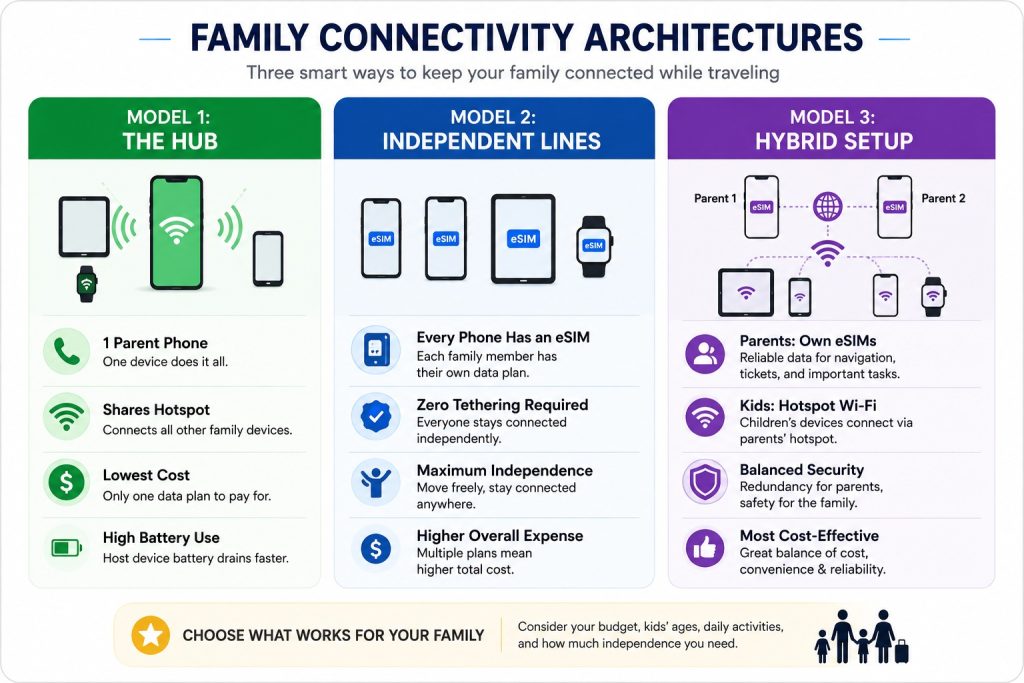
Model 1: The Single Hotspot Hub (Best for Young Kids & Tablets)
The single hotspot model relies entirely on one primary parent device to provide internet access. One adult purchases a large data package and broadcasts a secure local Wi-Fi network to nearby family members.
Consequently, younger children can easily browse educational games and watch movies on their Wi-Fi-only iPads during transit. You save substantial money because you only purchase and manage a single digital line for the entire vacation.
However, this setup requires every child to remain physically close to the parent providing the signal. If the parent steps away to buy groceries or coffee, the children immediately lose their internet connection completely.
Model 2: Individual eSIM Profiles (Best for Teens & Adults)
The second approach assigns a dedicated digital travel plan to every single family member’s personal handset. This setup gives each teenager and adult total digital freedom without depending on anyone else’s mobile signal.
Therefore, family members can split up inside shopping malls, amusement parks, or busy museums without losing contact. Everyone maintains their own independent data stream for instant messaging, live mapping, and emergency voice calls.
Nevertheless, purchasing separate packages for four or five handsets increases your upfront vacation expenses noticeably. This model works best when traveling with older teenagers who demand independent schedules and continuous social connectivity.
Model 3: The Hybrid Architecture (The Sweet Spot for Families)
The hybrid architecture combines the greatest financial and safety advantages of both earlier connectivity systems. Both parents activate dedicated, reliable plans on their primary phones to manage navigation, tickets, and bookings.
Meanwhile, parents share eSIM hotspot multiple devices connections to secondary tablets and younger children’s hand-me-down phones. This strategy keeps total package expenses exceptionally low while maintaining vital navigation redundancy across both adult travelers.
Furthermore, neither parent risks running out of battery power alone because they alternate hotspot hosting responsibilities daily. Most international travel groups discover that this balanced configuration delivers the absolute best family value abroad.
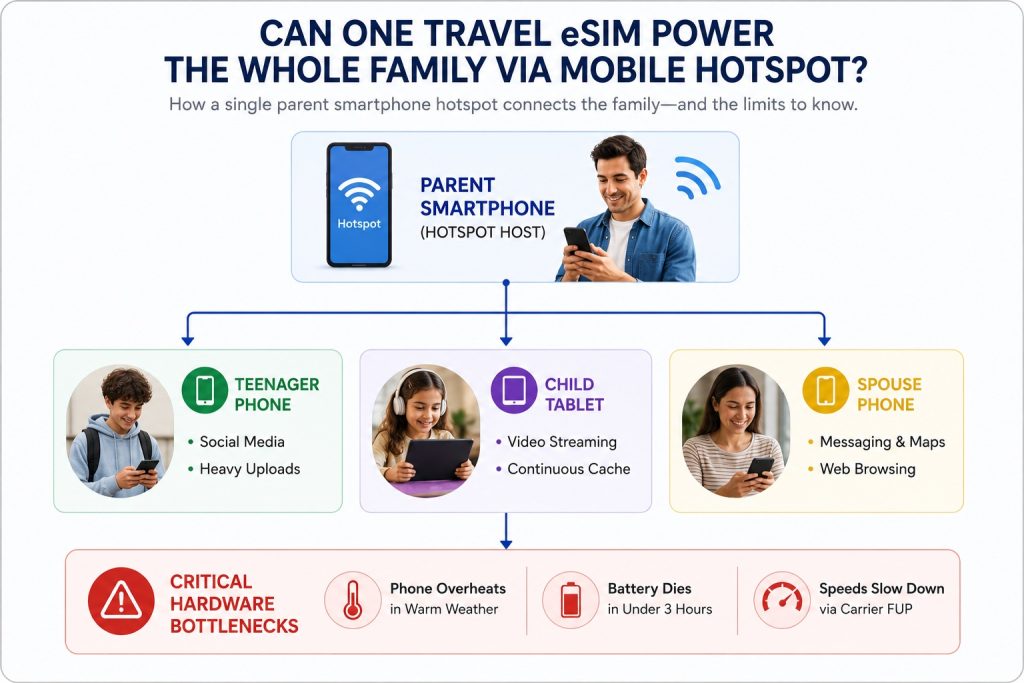
Can One Travel eSIM Power the Whole Family via Mobile Hotspot?
Many parents ask whether they can simply share eSIM hotspot multiple devices from a single smartphone. While tethering is technically possible on modern networks, relying on one phone introduces serious physical limitations.
Before committing to a single-device strategy, you must evaluate hardware strain and network restrictions carefully. Let us examine how heavy multi-device tethering impacts real-world battery performance and carrier bandwidth abroad.
The Hidden Battery Drain and Physical Range Problem
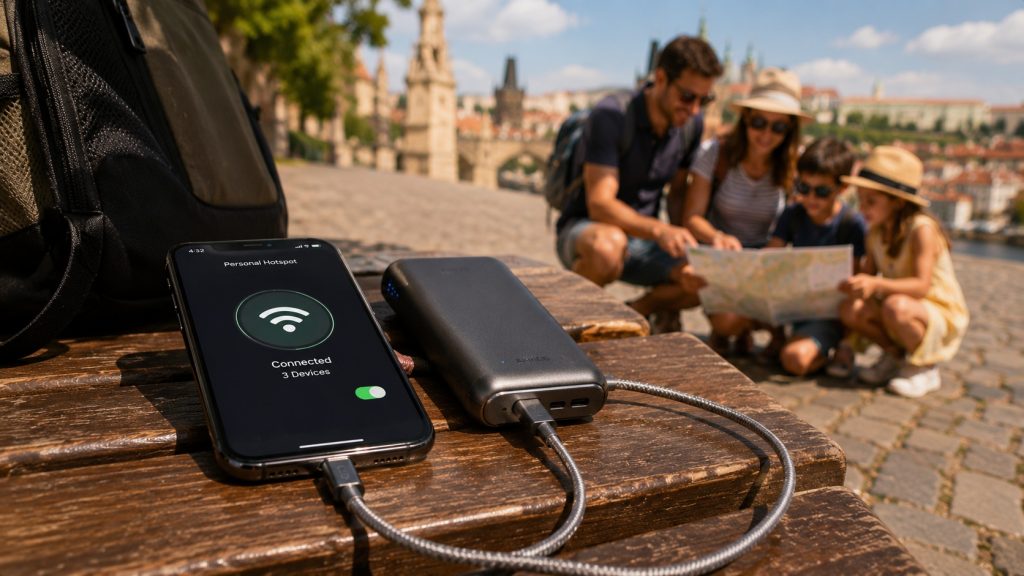
Broadcasting a personal Wi-Fi network forces your smartphone’s internal modem to transmit and receive data simultaneously. As a result, your host handset works under constant stress, generating noticeable heat inside your pocket.
Your battery will drain at triple its normal speed, often dying completely within three short hours. Therefore, parents who tether multiple devices must carry heavy external power banks everywhere they explore.
Additionally, standard consumer smartphone hotspots feature an effective transmission radius of roughly twenty to thirty feet. If your teenager wanders down a foreign museum aisle, their connection drops instantly without warning.
Hotspot Throttling and Fair Usage Policies (FUP)
Telecom providers frequently enforce strict data rules known globally as Fair Usage Policies on their infrastructure. When carriers detect multiple hardware connections routing through a single line, they frequently restrict maximum transmission speeds.
Furthermore, several popular providers completely block hotspot capabilities on their marketed “unlimited” international data plans. Once your group downloads a few heavy files, the network triggers aggressive speed throttling automatically.
Your fast 5G speeds can plunge suddenly to an agonizing one hundred twenty-eight kilobits per second. This crawl renders city maps, ride-hailing applications, and basic translation tools almost completely unusable for everyone.
The Family Travel Data Calculator: How Much Data Do You Actually Need?
Accurately calculating your group’s digital consumption prevents you from running out of internet in unfamiliar surroundings. Guessing your requirements usually leads to purchasing overpriced enterprise packages or suffering sudden connectivity cutoffs mid-trip.
A realistic family travel data calculator must account for diverse usage habits across distinct family generations. Let us break down exact consumption metrics for a typical household over a standard seven-day vacation.
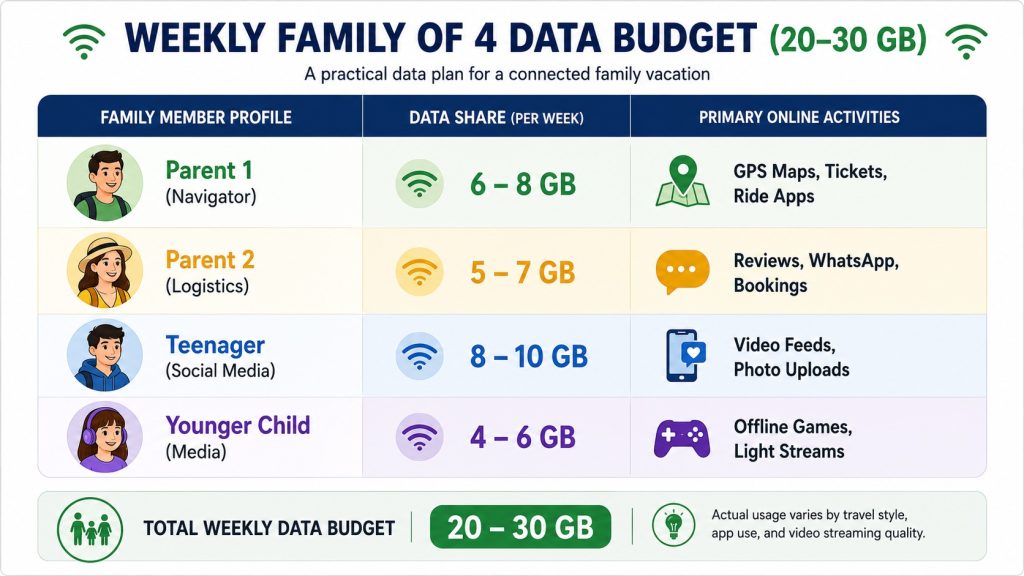
Breaking Down Weekly Consumption for a Family of Four
A standard family of four typically consumes between twenty and thirty gigabytes of cellular data weekly. Parents primarily use background data for active road navigation, translated menus, restaurant reviews, and digital train passes.
These essential logistical travel tools consume roughly one to two gigabytes per adult over seven days. However, teenagers scrolling through multimedia feeds and uploading high-definition vacation stories consume data far more rapidly.
A single teenager can burn through eight gigabytes alone if you allow unrestricted background application syncing. Understanding this consumption distribution ensures you purchase the exact gigabyte allocations your group requires without overspending.
Simple Tactics to Prevent Kids from Draining Your Shared Data
Parents can easily restrict unintentional background consumption by adjusting a few critical software settings before takeoff. These simple adjustments protect your shared hotspot pool from disappearing during the first two vacation days.
- Turn on Low Data Mode inside your children’s Apple iOS or Android device settings.
- Download entire city areas offline within Google Maps using your home Wi-Fi before departure.
- Cache your children’s favorite Netflix shows, YouTube videos, and music playlists directly onto local storage.
- Disable automatic operating system updates and cloud photo backups over cellular and mobile hotspot connections.
- Turn off auto-play settings within social media applications like Instagram, TikTok, and YouTube.
What to Do When Older Phones Do Not Support eSIM
Many families hand down older smartphone models to their young children for entertainment and emergency calls. Unfortunately, older consumer handsets often lack the internal embedded hardware chips required to activate digital eSIM profiles.
Leaving home without checking hardware compatibility leads to massive frustration upon landing at foreign airport terminals. Fortunately, parents can resolve hardware discrepancies easily using several practical, low-cost technical workarounds.
Note: Explore our YouTube channel — from step‑by‑step technical setup videos to immersive travel stories.
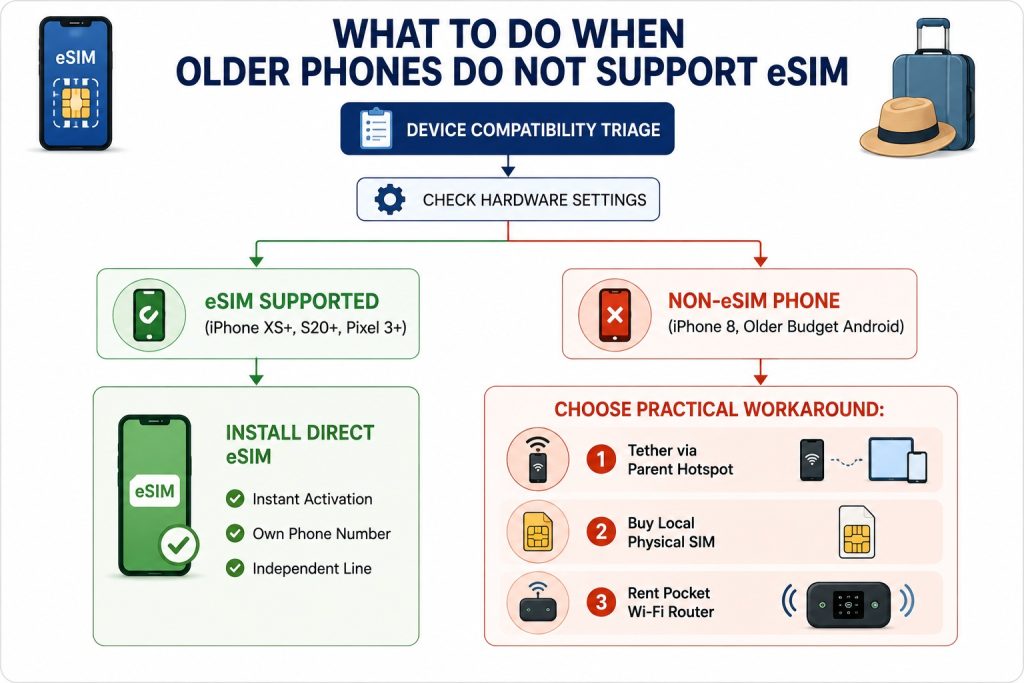
Identifying Non-eSIM Handsets in Your Family Fleet
Before purchasing any international plans, verify the specific hardware generation of every device in your household. Apple introduced digital SIM hardware starting with the iPhone XS, iPhone XR, and second-generation iPhone SE models.
Popular older models like the iPhone 7, iPhone 8, and iPhone X completely lack embedded SIM hardware. Similarly, Samsung introduced embedded chip technology on the Galaxy S20 series and newer flagship devices.
Many budget-friendly Android handsets manufactured recently also exclude digital SIM chips to minimize retail production costs. Dial *#06# on any phone keypad to confirm whether an embedded identity registration number appears.
Note: Explore our YouTube channel — from step‑by‑step technical setup videos to immersive travel stories.
Practical Hardware Workarounds for Hand-Me-Down Phones
If your child carries a non-eSIM device, you still have three excellent connectivity options available abroad. First, the child can connect to an adult’s shared mobile hotspot whenever the family travels together.
Second, parents can purchase a cheap physical tourist SIM card from a local kiosk upon arrival. You insert the physical plastic card into your child’s older tray, granting them independent cellular service immediately.
Third, families carrying numerous non-eSIM laptops and gaming consoles can rent a dedicated pocket Wi-Fi router. This compact battery-powered modem connects multiple older devices easily without draining any parent’s primary personal smartphone.
Family Provider Comparison: Airalo vs. Holafly vs. Nomad vs. Hubbing Ecom
Choosing the right cellular retailer makes a dramatic financial difference when outfitting an entire traveling family. Different brands cater to completely different consumer travel habits, technical requirements, and daily data appetites.
We evaluated the four leading providers across key metrics that matter specifically to multi-device family travelers. The comparison table below highlights tethering allowances, pricing structures, and overall value for family itineraries.
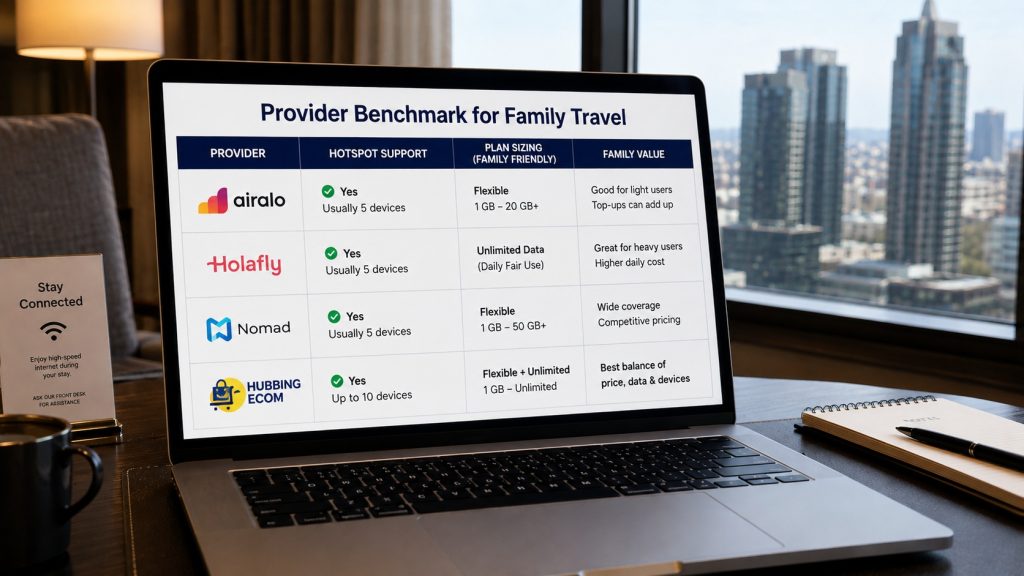
Tethering Rules, Pricing Structure, and Multi-Device Value
Airalo operates on a straightforward pay-per-gigabyte pricing model that allows unrestricted hotspot tethering across all networks. However, purchasing multiple individual three-gigabyte packages for four people can become costly on longer two-week journeys.
Holafly offers unlimited data marketing, but strictly limits or completely bans hotspot tethering on most international destinations. Furthermore, their aggressive Fair Usage Policy throttles speeds dramatically once a household streams video, frustrating parents quickly.
Nomad provides competitive tiered bundles, making it attractive for travelers who understand their exact gigabyte limits. Yet, managing multiple separate accounts across individual child devices inside Nomad’s app interface can feel cumbersome.
Hubbing Ecom focuses heavily on unrestricted tethering throughput and transparent high-speed data buckets designed for groups. Parents can easily broadcast robust hotspot connections to tablets without worrying about sudden artificial speed caps.
Single-Country vs. Regional Plans for Family Itineraries
Families planning scenic driving holidays across Europe or Southeast Asia must choose between national and regional plans. Purchasing individual country plans forces parents to reconfigure settings and purchase new subscriptions at every single border.
A regional package covers dozens of neighboring nations under a single, seamless digital profile automatically. Your children maintain continuous internet connectivity while crossing borders on international trains without any technical interruptions.
Although regional bundles cost slightly more than single-country profiles, the convenience saves hours of stressful troubleshooting. For cross-border family road trips, regional plans represent an indispensable investment in uninterrupted vacation peace.
The Safety Protocol: Why Teens Need an Independent Line
Many parents attempt to save twenty dollars by forcing their independent teenage children to tether exclusively. However, relying entirely on a parent’s mobile hotspot creates an enormous, unnecessary personal safety vulnerability abroad.
Foreign train terminals, crowded festivals, and busy theme parks present constant opportunities for accidental group separation. If a teenager loses Wi-Fi contact, their smartphone transforms into an offline brick without communication capabilities.
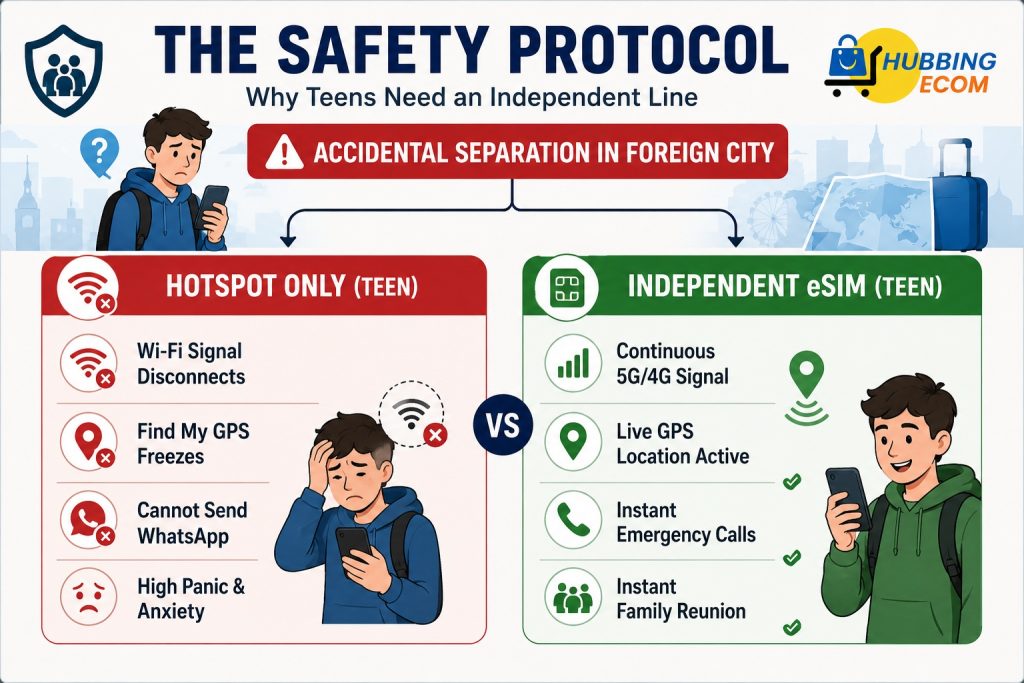
Giving every teenager a dedicated personal line ensures that family location-sharing applications operate continuously everywhere you explore. Apple’s Find My and Google Maps Location Sharing require active cellular signals to transmit accurate coordinates.
When teenagers carry their own independent connections, parents can monitor their geographic location across foreign cities effortlessly. Furthermore, teens can message parents immediately via WhatsApp if they miss a scheduled transit connection.
Never compromise your child’s physical safety simply to shave a few dollars off your international vacation budget. Invest in small, independent plans for older children to guarantee rapid communication whenever your family separates.
Family eSIM Setup Quick Reference Guide
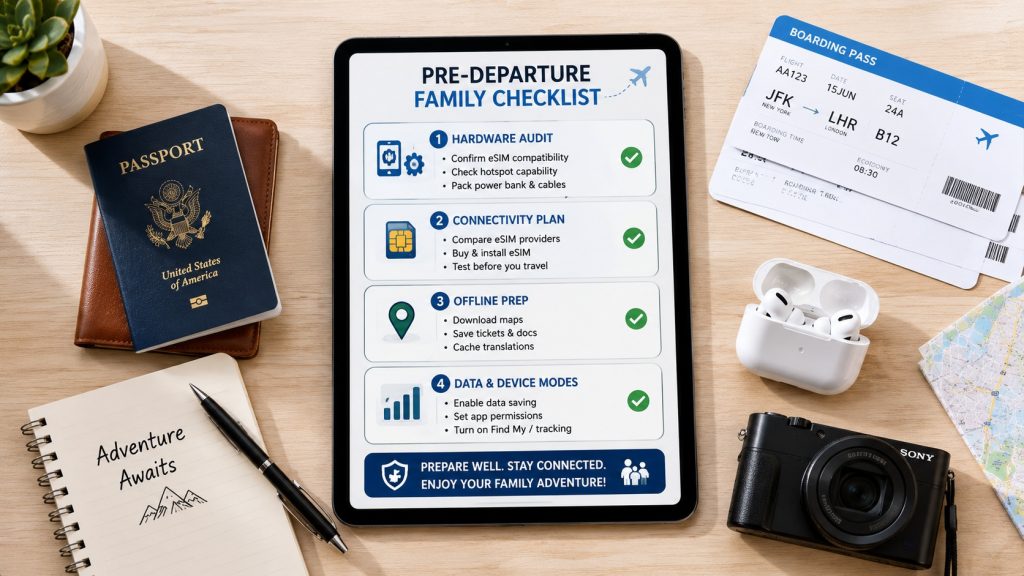
Follow this simple pre-departure implementation checklist to guarantee a smooth, stress-free connectivity experience across all devices:
- Audit Household Hardware: Dial *#06# on every device to identify non-eSIM models two weeks before departure.
- Assign Strategic Roles: Designate primary parent phones as navigation hubs and configure secondary devices for entertainment.
- Purchase Digital Profiles Early: Buy your regional or national packages online before arriving at the airport terminal.
- Install Profiles on Home Wi-Fi: Scan your activation QR codes comfortably at home to avoid airport network errors.
- Enforce Local Caching: Download offline city maps, streaming video episodes, and audiobooks over home broadband.
- Activate Low Data Mode: Restrict background app refreshes and cloud photo syncing on all children’s tablets.
- Test Hotspot Tethering: Connect your kids’ tablets to your primary phone at home to verify hotspot functionality.
Frequently Asked Questions (FAQs)
Can I buy one travel eSIM on my phone and share internet with my kids' iPads?
Yes, you can easily share your connection if your provider explicitly allows personal hotspot tethering. Your children’s iPads connect to your smartphone’s secure Wi-Fi network exactly like a standard home router.
Does sharing a hotspot with four family members slow down my connection?
Yes, mobile network bandwidth splits evenly among every connected wireless device on your personal hotspot. If your children stream high-definition video files simultaneously, web browsing and mapping on your host phone will slow noticeably.
Can I manage multiple eSIM profiles from a single account on one phone?
Most major provider applications allow you to purchase multiple digital profiles under one central parent account. You simply forward the generated installation QR codes or setup links directly to your family members’ individual handsets.
Is an unlimited data eSIM better for a family than a fixed-data plan?
Not usually, because most unlimited travel plans enforce strict daily speed caps or ban personal hotspot tethering completely. A large fixed-data package with transparent high-speed allowances offers far better performance and reliability for multi-device family sharing.
What should we do if our child's phone is an older model without an eSIM chip?
You can tether their older device to a parent’s active hotspot or purchase a local physical SIM card. Alternatively, you can rent a portable pocket Wi-Fi router to connect all non-eSIM family devices easily.
You May Like Reading Similar Blogs
How to Keep Your WhatsApp Number Active While Using a Travel eSIM
Is Your Phone eSIM Compatible? Check in 60 Seconds
Top 15 Things to Do in Langkawi
Should I Install My eSIM Before Travel or After Landing?
eSIM for Short Layovers and Airport Transit: Do You Really Need Data for 2–6 Hours?
eSIM for Digital Nomads and Remote Workers
eSIM Security and Privacy: Is Your Data Safe When Traveling?
Best eSIM, Physical SIM for Southeast Asia: Nepal, Sri Lanka, Philippines, Bali Compared
Best Asia eSIM for Indians, NRIs and International Tourists: Travel Across 20 Plus Countries
Affordable eSIM for Singapore: Safe High‑Speed Data for International Tourists
Is ‘Unlimited’ eSIM Really Unlimited? The Truth About Throttling & Hidden Data Limits
How Much eSIM Data Do I Really Need? A Calculator for Every Type of Traveler
Complete eSIM Troubleshooting Guide — Why It’s Not Working & How to Fix It
How to check eSIM Data usage on iPhone?
Why you should use eSIM and Wi-Fi Map in conjunction? On your international trip..
12 Factors That Effect Your Data Speed On Foreign Trip
eSIM vs public WiFi vs VPN: A Comparison of Internet Access Methods
Can i change the APN Settings?
Subscribe to our YouTube channel and follow us on Instagram for more updates.

Leave a comment